best AI assistants for people who hate repeating context
8 Best AI Assistants for People Who Hate Repeating Context in 2026
Compare AI assistants that reduce repeated context across chats, projects, files, and apps, with clear tradeoffs for personal and professional workflows.
Methodology: Comparison based on official memory, project, file, search, connected-app, and portability documentation reviewed on 2026-09-04.
Original contribution: A workflow-level comparison that measures repetition across chats, projects, files, apps, and personal life rather than memory alone.

In this guide
- Quick answer: the best AI assistants for people who hate repeating context
- What “repeating context” actually means
- How we ranked these assistants
- 1. ChatGPT: best overall for automatic continuity
- 2. Claude: best if you constantly need to retrieve old discussions
- 3. Gemini: best if you are tired of starting over when switching AI
- 4. Gemora: best for people who hate repeating the story of their life
- 5. Perplexity Computer + Brain: best for long-running research and operational work
- 6. Microsoft Copilot: best for recurring Microsoft-centric work
- 7. Pi: best for low-friction personal conversation
- 8. Notion AI: best when the context already lives in your workspace
- Which assistant makes you repeat yourself the least?
- The important difference: personal memory vs project memory
- Memory vs retrieval: stop expecting one feature to do both
- Why project work needs different context than personal life
- Which assistant has the best context portability?
- A simple test: which AI actually makes you repeat less?
- How to reduce repetition even if your AI memory is imperfect
- What you should not ask AI to remember
- Final verdict
Related reading: memory vs history · apps with recall · long-term assistants · memory controls.
The best context-aware AI is not necessarily the one that stores the most. It is the one that lets the next conversation begin further ahead. Source: Gemora.
You explain your project.
Then you open a new chat and explain the project again.
You explain who someone is.
Then you explain who they are again.
You explain that the deadline moved, that you already tried the obvious fix, that your priorities changed, that “Sam” is the same Sam from last week, and that no, you are not asking about the old plan anymore.
At some point, using AI starts to feel less like having an assistant and more like repeatedly onboarding a very talented new employee with a head injury.
This guide is for people who are tired of that.
In 2026, several AI products have moved beyond isolated chat sessions.
ChatGPT now synthesizes memory across conversations and other supported sources.
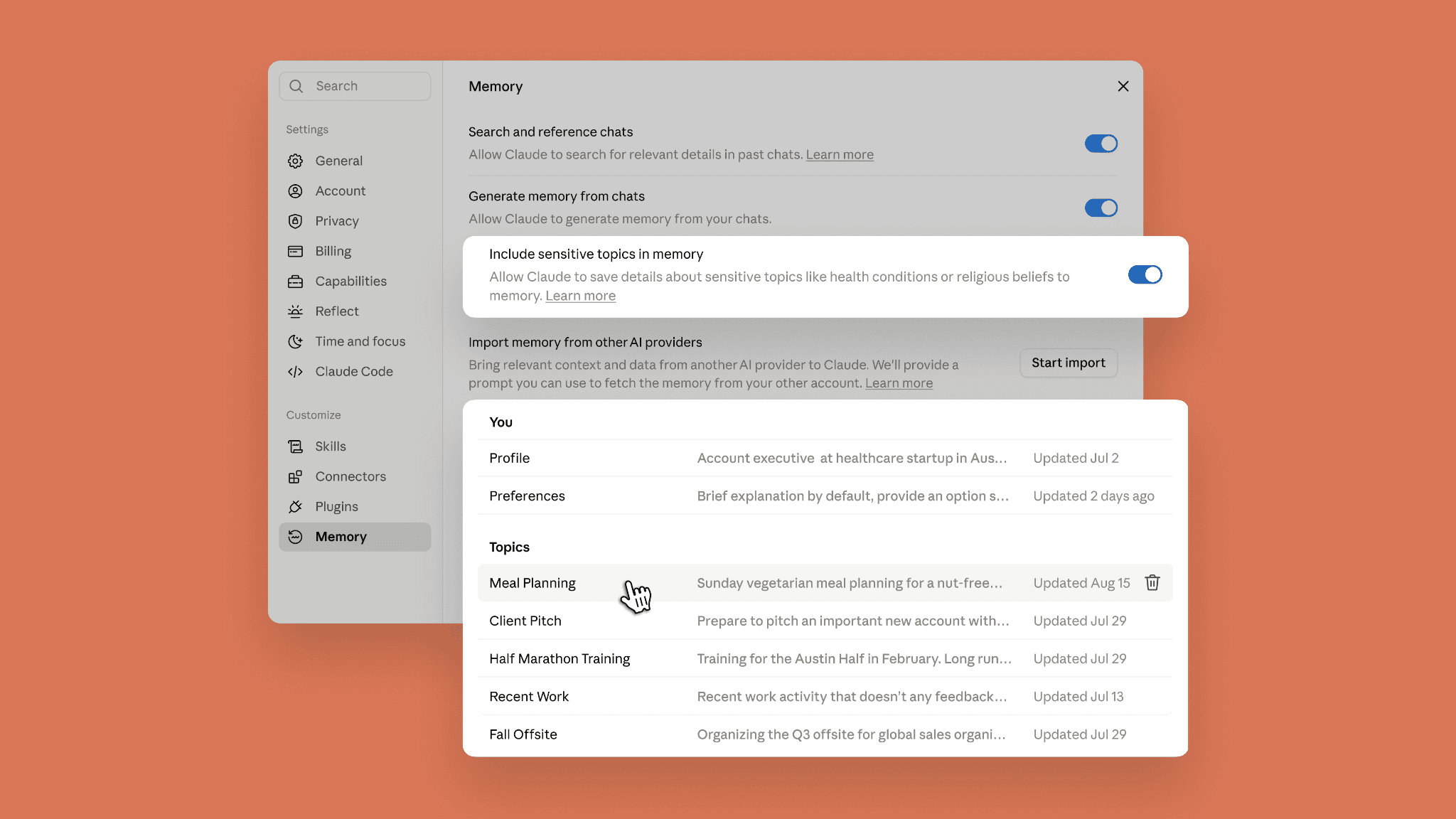
Claude can carry memory across chats, expose remembered context as editable Topics, and search old conversations directly.
Gemini can personalize from past chats and can import memory and full chat-history exports from other AI providers.
Perplexity's new Brain system builds a live graph of projects, people, files, decisions, and connected tools.
Microsoft Copilot can learn preferences, recurring tasks, and work context from prior chats.
Pi remembers durable personal details.
Notion AI searches your workspace and connected apps so you do not have to manually reconstruct work context.
And Gemora is built around keeping the thread of your everyday life connected over time.
These products all reduce repetition.
But they do it in very different ways.
So we compared them around one practical question:
How much context do I have to rebuild before this AI becomes useful again?
Quick answer: the best AI assistants for people who hate repeating context
| AI assistant | Best for | What it saves you from repeating |
|---|---|---|
| ChatGPT | Best overall | Preferences, projects, constraints, personal context across chats |
| Claude | Best for exact past-chat retrieval and projects | Previous discussions, project decisions, work context |
| Gemini | Best for switching AI and Google ecosystem context | Past chats, imported memories, imported chat history, Google context |
| Gemora | Best for continuity around your personal life | People, situations, decisions, everyday conversations, changes over time |
| Perplexity Computer + Brain | Best for long-running research and work | Projects, files, people, decisions, connectors, open loops |
| Microsoft Copilot | Best for Microsoft-centric work | Work goals, recurring tasks, preferences, chat history |
| Pi | Best for simple conversational continuity | Durable personal preferences, goals, routines, interests |
| Notion AI | Best when your context already lives in a workspace | Docs, meetings, projects, Slack, Drive, Jira, team knowledge |
Our picks
Best overall: ChatGPT.
Best if you constantly say “we discussed this before”: Claude.
Best if you are switching from another AI: Gemini.
Best for conversations about your actual life: Gemora.
Best for long-running research or operational work: Perplexity Computer with Brain.
Best if your company lives in Microsoft 365: Microsoft Copilot.
Best low-friction personal conversation: Pi.
Best if your context already lives in documents and team tools: Notion AI.
Gemora publishes this comparison and is included in it. We say that explicitly because pretending a product magically wandered into its own ranking would be a charming little conflict-of-interest costume.
What “repeating context” actually means
People often talk about AI memory as though the problem is one thing.
It is not.
You can be forced to repeat yourself for several different reasons.
Type 1: repeating who you are
Examples:
“I am a product designer.”
“I prefer concise answers.”
“I am vegetarian.”
“I work primarily in React.”
This is stable personal context.
Type 2: repeating what you are working on
Examples:
“The launch is next month.”
“The onboarding problem is still unresolved.”
“We already rejected option B.”
This is active project context.
Type 3: repeating an old discussion
Examples:
“We talked about this last week.”
“Find the reasons we decided not to hire.”
This requires past-chat retrieval.
Type 4: repeating files and source material
Examples:
“Here is the same strategy deck again.”
“Here are the meeting notes again.”
This is a persistent workspace problem.
Type 5: repeating your entire AI history after switching tools
Examples:
“I used ChatGPT for a year. Now Claude/Gemini knows nothing.”
This is a context portability problem.
Type 6: repeating the story of your life
Examples:
“This is the person I told you about.”
“This is the same decision I have been struggling with for months.”
This is personal continuity.
The best AI assistant depends on which kind of repetition annoys you most.
How we ranked these assistants
We reviewed current official product pages, help documentation, release notes, and product behavior documented as of September 4, 2026.
We did not rank based on:
- model benchmark leaderboards,
- how many parameters someone claims to have,
- how cool the landing page gradient looks,
- or whether a founder used the word “memory” fourteen times on X.
We focused on six things.
1. Automatic continuity
Does the assistant carry useful context forward without requiring explicit setup every time?
2. Exact retrieval
Can you say:
“Find what we discussed before.”
and get the actual old conversation or source?
3. Current-state handling
Can the assistant understand that old information has changed?
4. Persistent project context
Can an ongoing project retain files, decisions, instructions, and work history?
5. Transparency and correction
Can you inspect, edit, or delete what the system thinks it knows?
6. Portability
Can you move context in or out instead of starting from zero?
Those are the things that actually determine whether an AI makes you repeat yourself.
1. ChatGPT: best overall for automatic continuity
Best for
People who want the AI to gradually understand more about them without turning memory management into a second job.
ChatGPT is currently the strongest general-purpose choice for people who simply want:
“Please stop making me explain the same basics.”
OpenAI's current memory system is built to synthesize useful context across conversations and keep that context more current over time.
OpenAI describes memory as the mechanism that lets future conversations begin from shared context rather than from scratch.
Source: OpenAI — Dreaming: Better Memory for a More Helpful ChatGPT

ChatGPT's Memory Summary shows a high-level synthesis of context accumulated across conversations. Source: OpenAI.
Why ChatGPT reduces repetition well
ChatGPT can learn things such as:
- your preferences,
- projects,
- constraints,
- working style,
- interests,
- recurring context,
- and other information that may help later answers.
The important part is that much of this can happen naturally.
You do not need to manually write:
Memory #391:
User prefers concise responses.
You talk.
The product builds context in the background.
That is what makes ChatGPT strong for people who hate setup.
ChatGPT is especially good at stable preferences
If you repeatedly prefer:
- short answers,
- certain formatting,
- a specific coding style,
- a type of recommendation,
- or a recurring work pattern,
ChatGPT can use that context later.
This removes the tedious first paragraph of many prompts.
Instead of:
“I am a solo developer building an Android app. Give me a short practical answer, not a generic explanation…”
you can often get closer to:
“What would you prioritize here?”
That is the experience memory is supposed to create.
ChatGPT now focuses heavily on freshness
A large memory system creates a new problem:
old context.
Suppose six months ago you said:
“My main goal is fundraising.”
Now:
“Distribution matters more.”
If the AI remembers both but continues to behave as though fundraising is current, memory has made the assistant worse.
OpenAI's 2026 architecture explicitly targets stale and contradictory context over long time horizons.

Without correct current context, even a capable model can give the wrong kind of personalized answer. Source: OpenAI.

The same model can become much more useful when the context is relevant and up to date. Source: OpenAI.
This is one reason ChatGPT wins overall.
It is not merely trying to remember more.
It is trying to maintain a changing model of what remains useful.
Memory Sources help when personalization goes wrong

Memory Sources can show some of the memories, past chats, custom instructions, files, and connected context behind a personalized answer. Source: OpenAI.
This helps solve:
“Why is ChatGPT assuming that?”
If a response uses stale context, you can sometimes identify the source and correct it.
Where ChatGPT is weaker
ChatGPT is more automatic than explicit.
Claude gives you clearer Topic-level memory management and a stronger conversational old-chat search workflow.
If what you really hate is:
“I know we discussed this. Find the exact conversation.”
Claude may be better.
Bottom line
Choose ChatGPT if your biggest annoyance is repeatedly explaining who you are, how you work, and the basic context around ongoing parts of your life.
2. Claude: best if you constantly need to retrieve old discussions
Best for
People who frequently say:
“We already discussed this.”
Claude's biggest advantage is that it treats memory and past-chat search as separate capabilities.
That is excellent.
Memory carries useful context forward.
Search retrieves the original discussion when you need detail.
Source: Claude Help — Chat Search and Memory
Claude carries remembered context across Chat and cloud Cowork experiences. Source: Anthropic.
The killer feature: ask Claude to find the old chat
On supported paid plans, you can ask:
“What did we discuss about onboarding?”
“Find the conversation where we compared those two options.”
“Continue where we left off.”
Claude searches previous chats using retrieval.
It can also reference the original conversation.
That means you do not have to:
- remember the title,
- scroll through history,
- find the exact thread,
- copy the important part,
- paste it into the new conversation.
The AI does the retrieval.
For people who use AI as a serious work partner, this matters more than flashy “infinite memory” claims.
Claude makes memory unusually inspectable
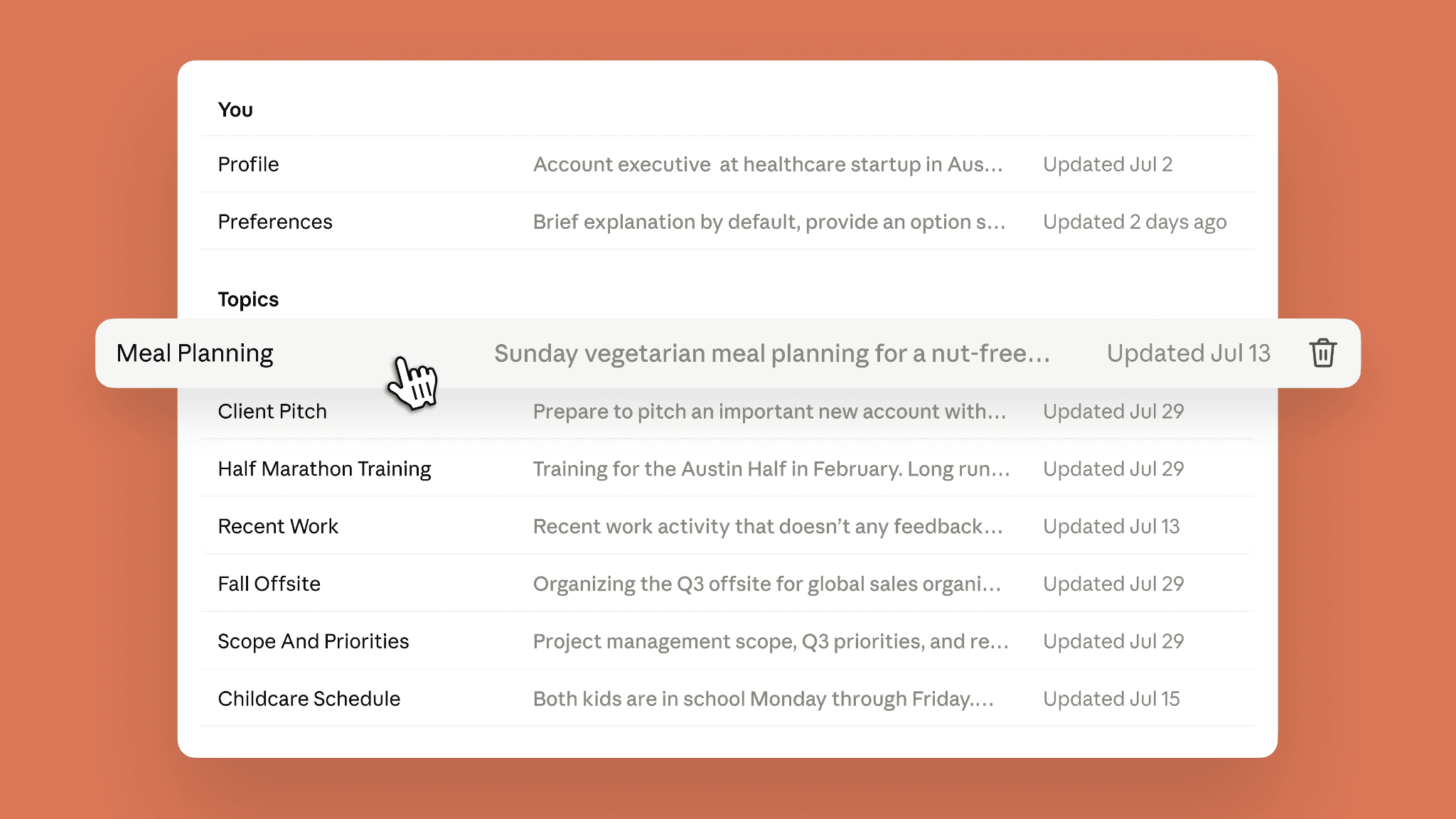
Claude organizes remembered context into Topics that users can inspect directly. Source: Anthropic.
You can see what Claude remembers.
Open a Topic.
Read it.
Edit it.
Delete it.
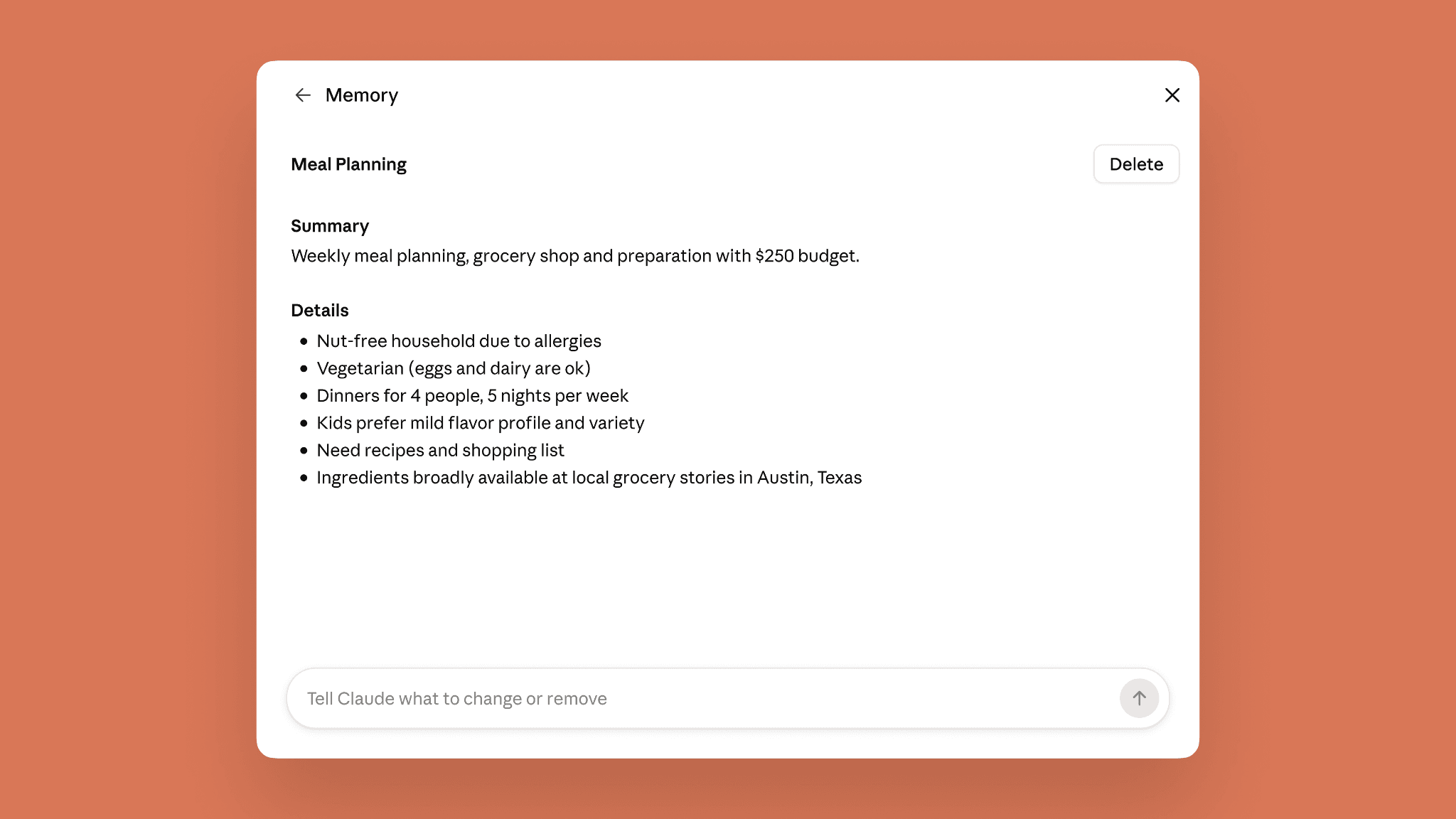
Claude Topics can be edited or removed when the context changes. Source: Anthropic.
That is excellent if your problem is not only repetition but wrong repetition:
“Stop making me correct the same stale fact.”
Claude is particularly good for projects
Claude can isolate search within an individual project.
That keeps one project's history from being unnecessarily mixed with another.
For example:
Project A: Launch
Project B: Fundraising
Project C: Research
Each can keep its own context.
This is useful because people who hate repetition usually also hate context pollution.
Claude can import and export memory
Anthropic now supports memory migration.
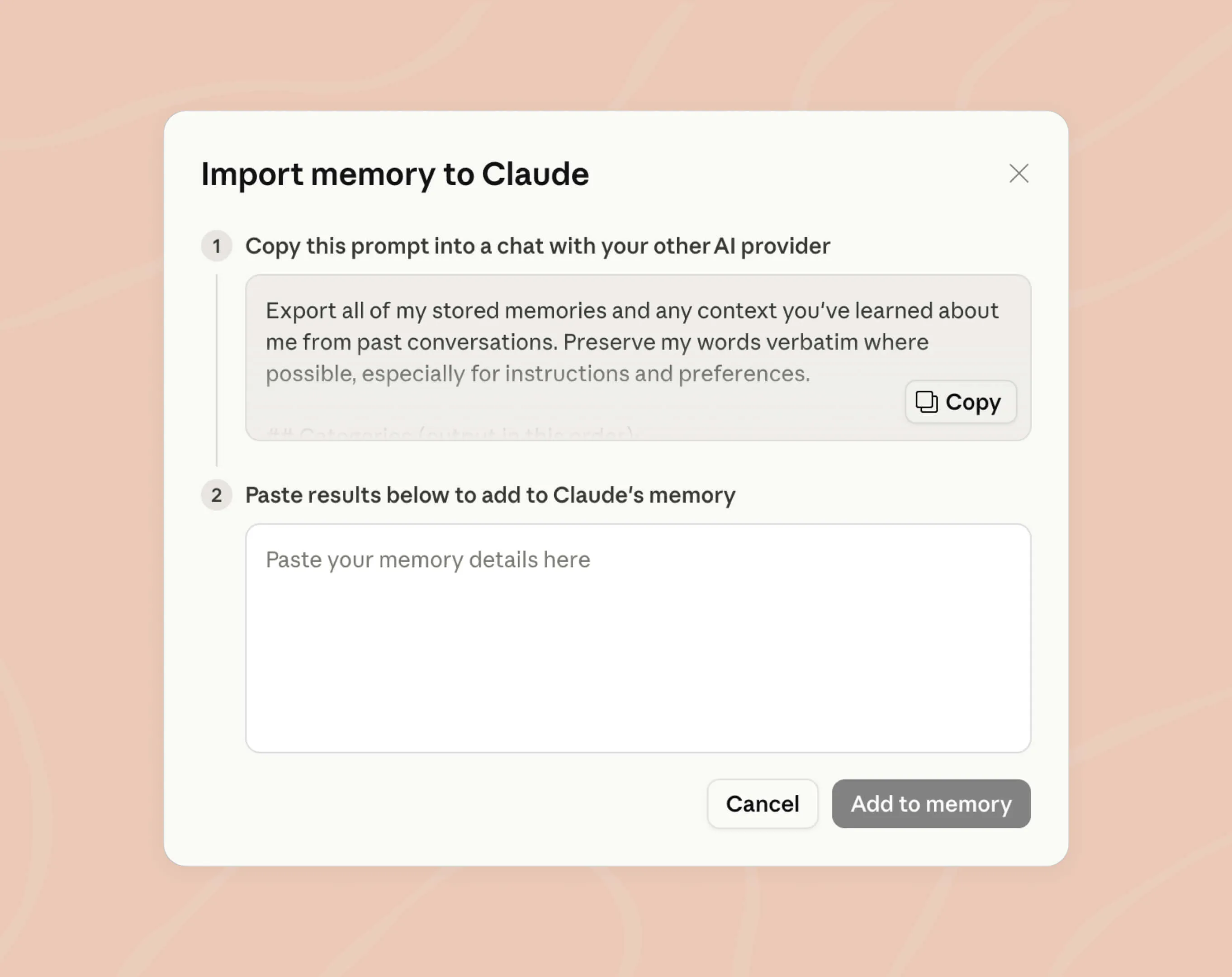
Claude can import a context summary from another AI provider. Source: Anthropic.
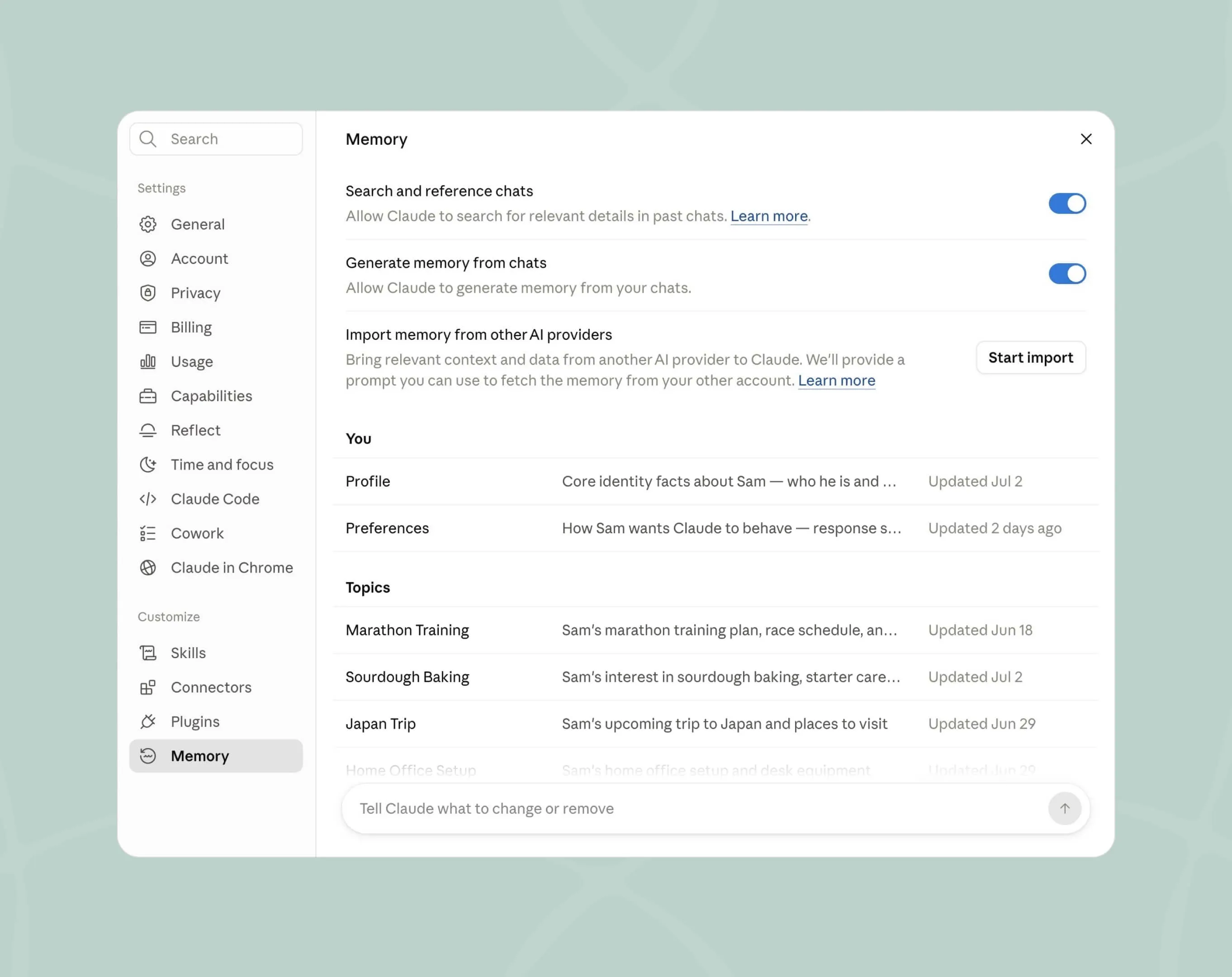
Imported context becomes reviewable memory instead of forcing the user to manually repeat everything. Source: Anthropic.
This is especially useful if you have already spent months teaching another assistant your preferences.
Where Claude is weaker
Anthropic's current memory design is more work-oriented than ChatGPT's broad personal memory system.
Claude is excellent for:
- projects,
- work preferences,
- long-running decisions,
- research,
- exact history.
If you want broad everyday personal continuity across the messiness of life, ChatGPT or Gemora may feel more natural.
Bottom line
Choose Claude if the sentence you are most tired of typing is: “We talked about this before.”
3. Gemini: best if you are tired of starting over when switching AI
Best for
People who want context to survive not only across Gemini chats, but also when moving from another AI service.
Gemini deserves a high ranking because Google has attacked the migration problem directly.
In 2026, Google introduced:
- memory from past Gemini conversations,
- structured memory import,
- full external chat-history import.
Source: Google — Switch to Gemini
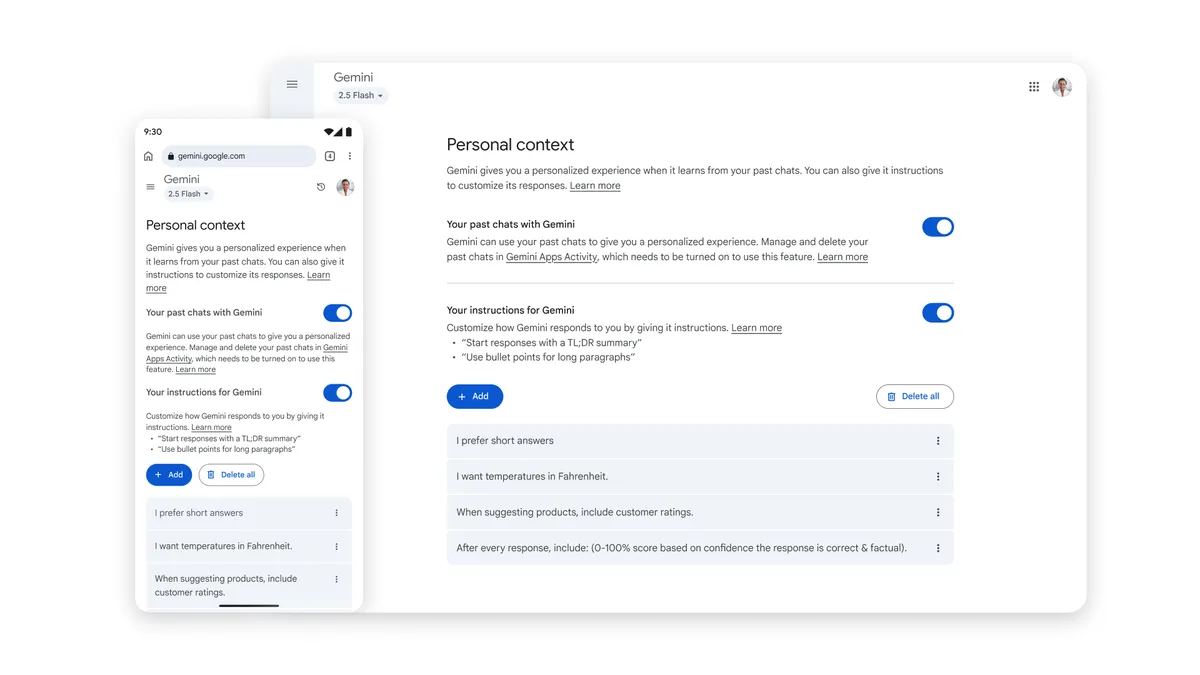
Gemini remembers past chats
Google says Gemini can learn from your past chats so it better understands you and your world.
Current requirements include:
- age 18+,
- personal Google Account,
- Keep Activity enabled.
Source: Gemini Help — Memory of Past Chats
Gemini Personal Context settings (source image)
Gemini can use previous chats for personalization when the relevant Personal Intelligence settings are enabled. Source: Google.
This reduces normal cross-chat repetition.
But Gemini becomes more interesting when you switch products.
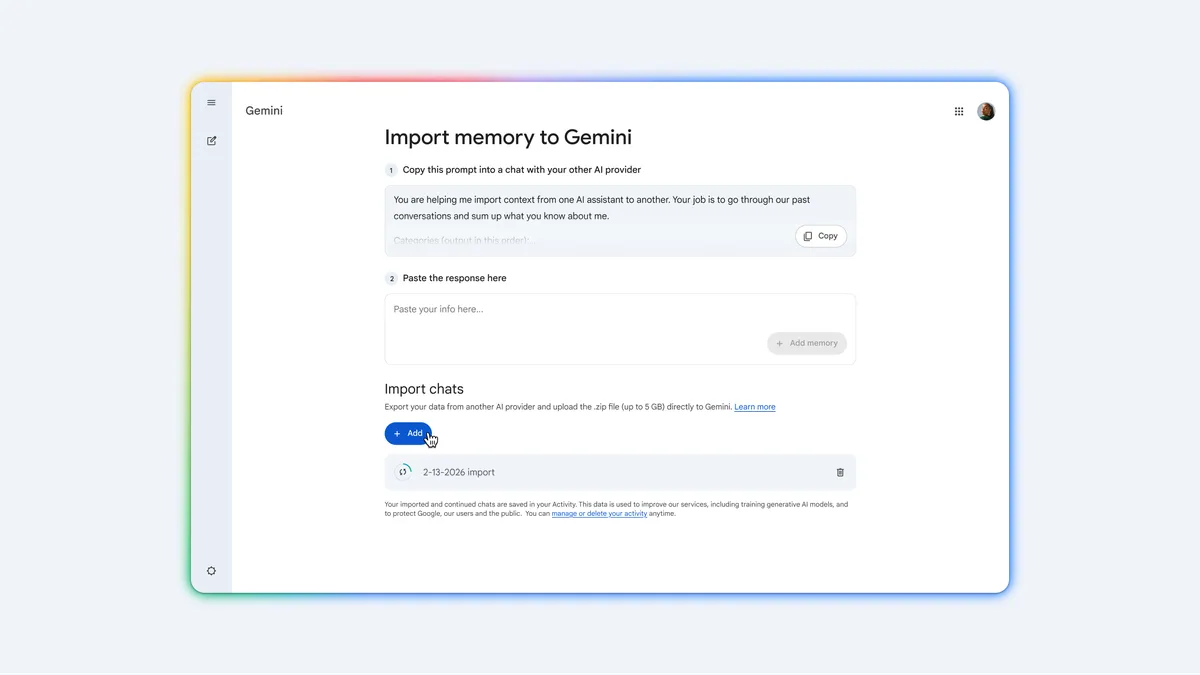
Import memory instead of reintroducing yourself
Gemini Import Memory (source image)
Gemini can import a structured summary of preferences, remembered facts, and contextual information from another AI platform. Source: Google.
Google's import flow lets you:
- copy a prompt from Gemini,
- run it inside your previous AI,
- copy the generated memory summary,
- paste it into Gemini.
Gemini then uses that context in future conversations.
That is far less painful than re-explaining yourself manually.
Import the full chat history too
Gemini Import Chat History (source image)
Gemini can import a full ZIP export of previous AI conversations, preserving the source history as well as summarized memory. Source: Google.
This is one of the most important context features in consumer AI.
A summary tells Gemini:
what may matter.
A full archive preserves:
what actually happened.
Google currently documents ZIP imports up to 5 GB, subject to account and regional availability.
That is a serious migration feature, not a marketing checkbox.
The Google ecosystem can reduce another kind of repetition
Gemini's broader Personal Intelligence can also use supported connected Google sources.
That means some context may already exist in:
- Gmail,
- Photos,
- Search,
- YouTube,
- or other connected Google services.
For the right user, this means less:
“Here is the booking again.”
and more:
“Use the information already in my account.”
Where Gemini is weaker
Feature availability is more conditional than the others.
Google currently limits some memory and import features by:
- region,
- account type,
- product surface.
The import feature is not currently available in the EEA, Switzerland, or the UK, and past-chat memory requires a personal account.
Bottom line
Choose Gemini if the repetition you hate most happens when switching assistants or re-supplying information already stored elsewhere in Google.
4. Gemora: best for people who hate repeating the story of their life
Best for
People whose repeated context is not mainly:
“Here is my company wiki.”
It is:
“This is the person I told you about.”
“This is the same situation from last week.”
“I finally made the decision.”
“I changed my mind.”
Gemora is designed around conversations about everyday life remaining connected.
Source: Gemora
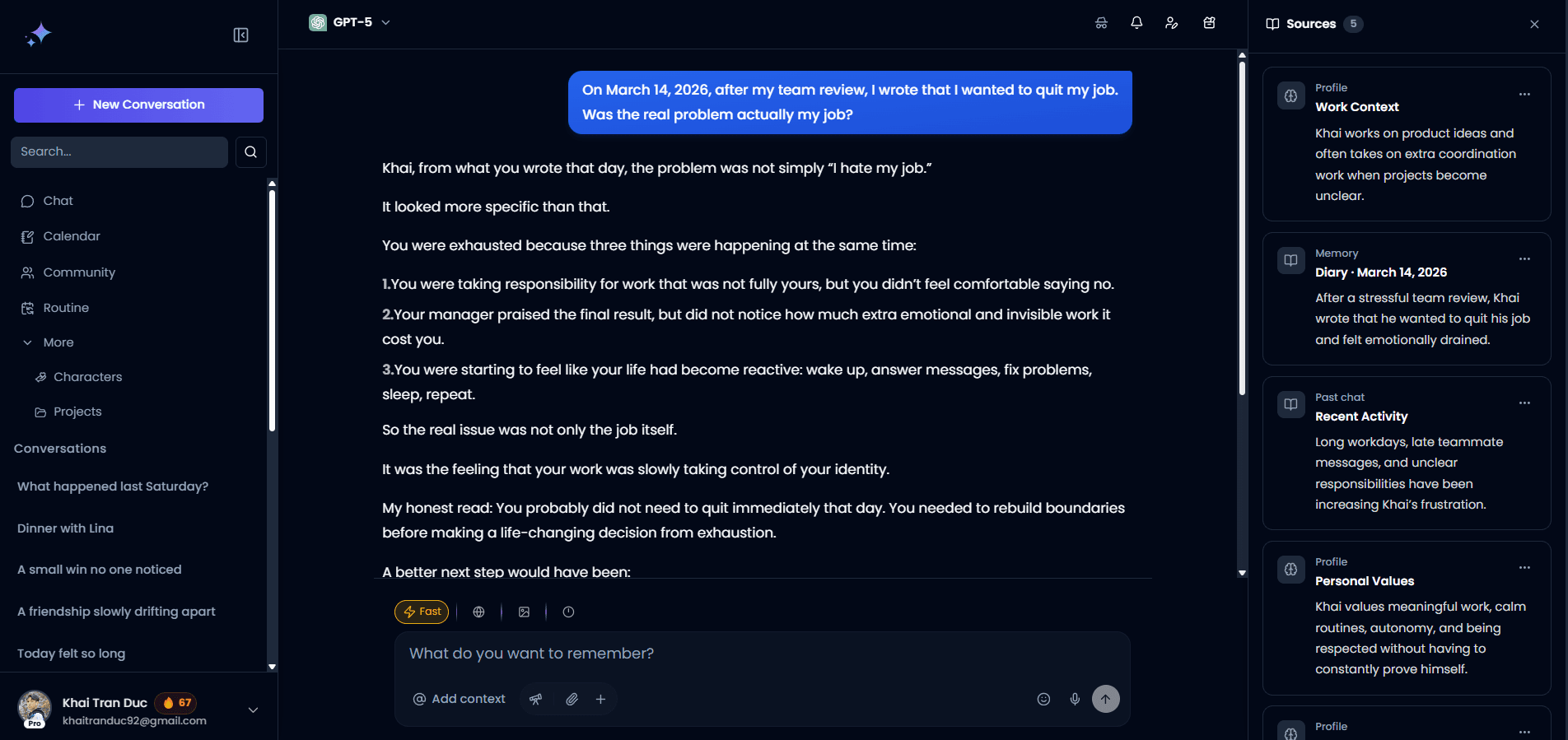
Gemora is built around conversations about everyday life continuing across time rather than behaving like isolated tickets. Source: Gemora.
Life context is different from project context
Suppose you talk about a difficult career decision over six weeks.
Week 1:
“I want to leave because I hate the workload.”
Week 3:
“Actually, the workload is manageable. I hate managing people.”
Week 5:
“I think what I really want is more autonomy.”
Week 6:
“I finally decided.”
A conventional memory system may preserve:
“User is considering leaving job.”
Useful.
Incomplete.
The more interesting context is how the reason changed.
Gemora is positioned around:
- conversations,
- recaps,
- memories,
- insights,
- people,
- projects,
- notes,
- tasks,
- and connected personal context.
The goal is not only to remember a fact.
It is to keep the thread.
Recap reduces “what was happening then?” repetition
Gemora Recap makes it easier to return to the days and situations around previous conversations. Source: Gemora.
A lot of personal context is remembered by time.
You may not remember:
“Conversation title: Untitled Chat 83.”
You remember:
“It was the week before the launch.”
That is why day-based context can be more natural than a list of generic chat titles.
Memories reduce manual digging

Gemora Memories is designed to resurface relevant old context without making users manually reconstruct every conversation. Source: Gemora.
Insights matter when the context changes

The most useful personal context often involves how priorities, thoughts, and situations changed over time. Source: Gemora.
This is the difference between:
“Remember that I was stressed.”
and:
“Notice that I stopped talking about the thing that used to stress me.”
The second is much closer to understanding life context.
Where Gemora is weaker
Gemora is more specialized.
If your main context is:
- code repositories,
- complex research,
- enterprise documents,
- team workspaces,
Claude, Perplexity, Microsoft Copilot, or Notion AI may be better.
Gemora is strongest when the repeated context is your life, not merely your files.
Bottom line
Choose Gemora if the thing you are tired of repeating is the human context around your conversations, not only the task context.
Your life should not require a fresh onboarding every time you open a chat. Gemora is built around keeping useful context connected so you can continue from what came before. Start talking with Gemora.
5. Perplexity Computer + Brain: best for long-running research and operational work
Best for
People who repeatedly return to the same complex work and are tired of re-supplying:
- files,
- people,
- decisions,
- sources,
- instructions,
- project history,
- open issues.
Perplexity's 2026 Brain feature is one of the most interesting context systems in this list.
Perplexity describes Brain as a self-improving memory system that builds a working model of:
- projects,
- people,
- files,
- decisions,
- open loops,
- sessions,
- and connected tools.
Source: Perplexity — What Is Brain?
Perplexity Brain memory graph (source image)
Perplexity Brain organizes memory into Concepts, Entities, and Workstreams and links entries back to source material. Source: Perplexity.
Brain is closer to a work-context graph than simple memory
Perplexity explicitly distinguishes:
Memory: helps Computer know you.
Brain: gives Computer working context to move your work forward.
That distinction is useful.
Brain learns from:
- sessions,
- connected tools,
- files and artifacts,
- corrections.
It updates what it knows, marks stale information, and links memory entries back to the original source.
That is exactly what people who hate repeating professional context want.
You can resume old work without recapping
Perplexity gives an example that captures the value:
Start a new conversation.
Point Computer at a project from weeks ago.
Brain can use:
- decisions,
- files,
- people,
- prior work,
- connected sources
instead of requiring you to recap everything manually.
That is a serious context advantage for recurring work.
Brain can scan connected sources
Perplexity Brain settings and connectors (source image)
Brain can incorporate connected sources such as Gmail, Calendar, GitHub, Linear, Microsoft Teams, Notion, Outlook, and Slack. Source: Perplexity.
This makes Perplexity particularly strong for:
- customer research,
- finance,
- operational analysis,
- long-running investigations,
- recurring reporting,
- multi-source project work.
Projects make the context persistent
Perplexity Projects now combine:
- Search conversations,
- Computer tasks,
- files,
- instructions,
- connectors,
- Brain memory.
Source: Perplexity — What Are Projects?
That is much closer to a persistent AI workspace than a normal chat history.
Where Perplexity is weaker
Brain is currently rolling out in Research Preview to Max and Enterprise Max users of Computer.
This is not the easiest consumer choice on the list.
It is also heavily optimized around work.
For everyday personal continuity, ChatGPT, Gemora, or Pi make more sense.
Bottom line
Choose Perplexity Computer + Brain if you hate re-explaining complex work more than you hate re-explaining yourself.
6. Microsoft Copilot: best for recurring Microsoft-centric work
Best for
People whose repeated context already lives around Microsoft 365.
Microsoft Copilot now has a more developed memory model than many people realize.
Microsoft says Copilot can remember:
- communication style,
- favorite topics,
- work goals,
- recurring tasks,
- and other useful details from previous Copilot Chat conversations.
Source: Microsoft — Personalize What Copilot Remembers
Copilot combines three kinds of personalization
Microsoft documents:
- Saved memories
- Inferences from chat history
- Custom instructions
That is a sensible structure.
Stable preferences can be explicit.
Chat history can teach the system recurring context.
Saved memories can preserve important details.
Copilot can update and merge memories
Microsoft says Copilot can intelligently:
- merge related memories,
- update outdated details,
- remove memories when asked.
This matters for recurring work because old context gets stale quickly.
Example:
“I prepare this report weekly.”
is useful.
But:
“The report goes to Jordan.”
may stop being true after Jordan changes roles.
Temporary Chat gives you a clean boundary
Microsoft also supports Temporary Chat for conversations that should not:
- access personalized memory,
- create memory,
- appear in normal history.
This is valuable for one-off tasks.
Important availability caveat
Microsoft's current consumer privacy documentation says personalization is not available in several markets, including Vietnam, as of September 2026.
Microsoft 365 organizational availability can differ from consumer Copilot availability.
So this is a strong global option, but you should verify the exact product and account you use.
Where Copilot is weaker
Copilot becomes most compelling when:
- your work lives in Microsoft,
- your organization has the relevant setup,
- and memory/personalization is actually available to your account.
If you want a consumer-first personal assistant with fewer ecosystem assumptions, ChatGPT or Claude is simpler.
Bottom line
Choose Microsoft Copilot if the context you keep repeating is mostly recurring Microsoft 365 work and your account has memory available.
7. Pi: best for low-friction personal conversation
Best for
People who do not need a project-management memory system.
They just want the AI to remember enough that ordinary conversation feels continuous.
Pi's memory is refreshingly simple.
Inflection says Pi now remembers across chats so users do not have to start from scratch.
Source: Pi Help Center — Pi's Memory

Pi focuses on conversational continuity rather than building a complicated workspace around memory. Source: Pi.
Pi remembers durable context
Pi focuses on things likely to remain true for a while, such as:
- interests,
- job or study,
- communication preferences,
- goals,
- routines,
- habits,
- family context with permission.
This is good design.
The point is not to remember:
“You had noodles on Thursday.”
It is to remember:
“You prefer short answers and are currently working toward X.”
You can explicitly say “Remember…”
Pi learns naturally, but users can also explicitly ask it to remember a detail.
The memory can be reviewed and managed.
This makes Pi a good option for people who want continuity without caring about advanced project structure.
Voice makes remembered context feel natural

Pi combines memory with voice conversation, reducing the friction of restating personal context while talking. Source: Pi.
Where Pi is weaker
Pi is not the best choice if you need:
- exact past-chat retrieval,
- enterprise files,
- project graphs,
- imported history,
- advanced workspace context.
It is much better at:
“Know enough about me that talking feels natural.”
Bottom line
Choose Pi if you want less repetition in everyday conversation without needing an entire context-management system.
8. Notion AI: best when the context already lives in your workspace
Best for
People who are less annoyed by repeating personal preferences and more annoyed by repeatedly pasting:
- docs,
- meeting notes,
- Jira tickets,
- Slack threads,
- project pages,
- Google Drive files.
Notion AI approaches context from the opposite direction.
Instead of building a large personal memory profile, it gives AI access to the work knowledge already stored across your workspace and connected apps.
Source: Notion AI Enterprise Search
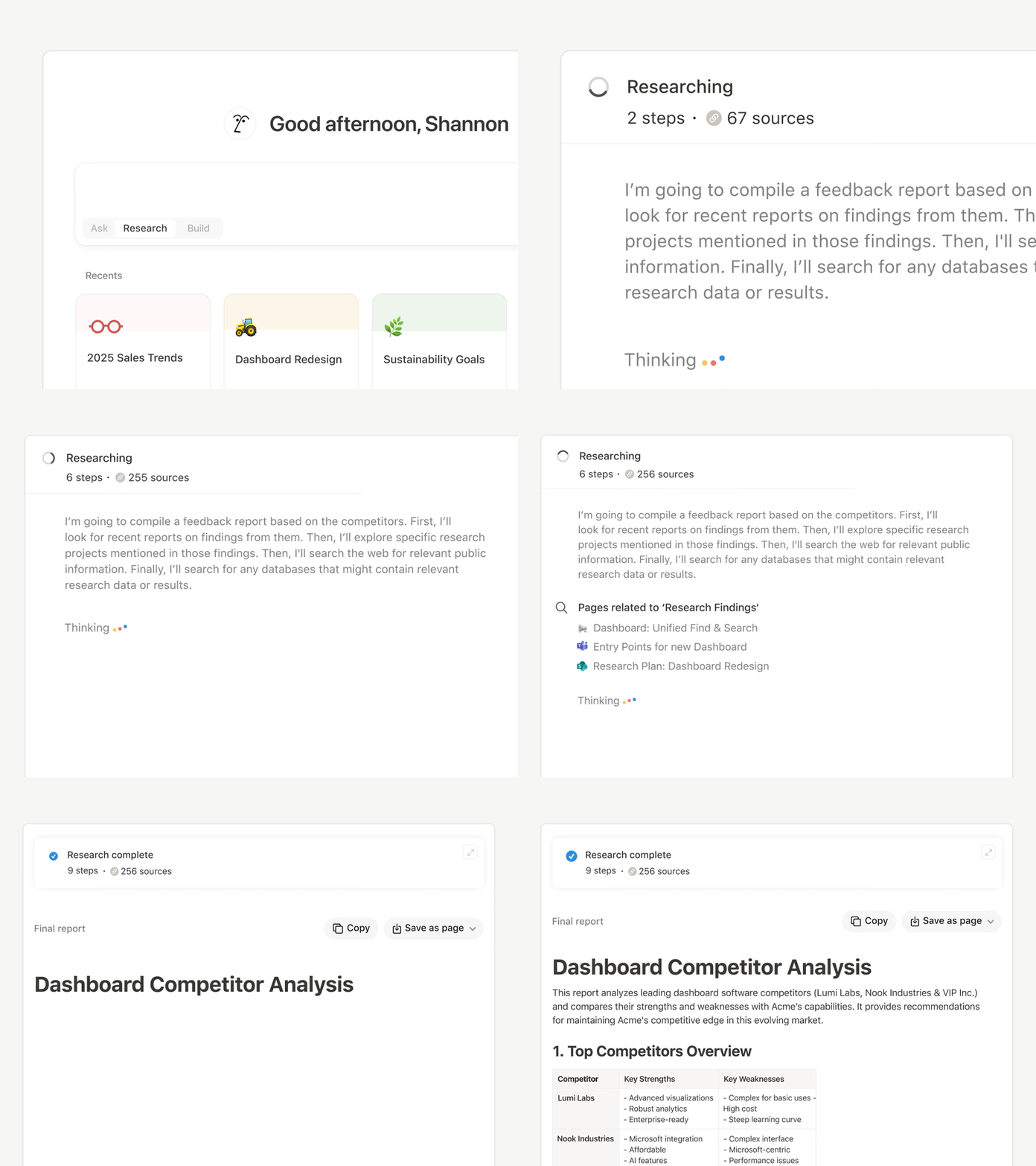
Notion AI can synthesize context from workspace content, connected apps, and the web rather than requiring users to paste the same documents repeatedly. Source: Notion.
Notion solves repetition by making the workspace the context
Suppose you ask:
“What is the status of the onboarding redesign?”
Instead of explaining:
- which project,
- which docs,
- which tickets,
- which meeting,
- which Slack channel,
Notion AI can search connected sources.
Current connectors include tools such as:
- Slack,
- Microsoft Teams,
- Google Drive,
- Jira,
- OneDrive,
- SharePoint.
That turns the problem from:
“Remember what I told you.”
into:
“Find the current truth from where the work already lives.”
For professional context, that can be better.
Source citations help reduce stale summaries
Notion AI cites the sources behind enterprise-search answers.
That means you can go back to:
- the meeting,
- the page,
- the ticket,
- the connected document.
This is especially useful in team environments where context changes independently of your chat history.
Where Notion AI is weaker
Notion AI is not really a personal-memory assistant in the same sense as ChatGPT, Pi, or Gemora.
It does not primarily solve:
“Remember my life.”
It solves:
“Stop making me paste my work knowledge into AI.”
That is a different and very valuable form of context continuity.
Bottom line
Choose Notion AI if the context you keep repeating already exists in documents and connected team tools.
Which assistant makes you repeat yourself the least?
That depends on what you repeat.
“I keep repeating my preferences and background.”
Winner: ChatGPT
Its automatic personal-context synthesis is currently the strongest general solution.
“I keep repeating what we already decided.”
Winner: Claude
Past-chat search plus project memory is extremely useful.
“I keep repeating everything when I switch AI.”
Winner: Gemini
Memory import + full chat-history import gives it the best migration story.
“I keep repeating who people are and what is happening in my life.”
Winner: Gemora
That is the product's core use case.
“I keep repeating project files, decisions, and open issues.”
Winner: Perplexity Computer + Brain
Brain is explicitly built around reconstructing working context.
“I keep repeating Microsoft work preferences and recurring tasks.”
Winner: Microsoft Copilot
Assuming memory is available on your account.
“I keep repeating basic personal context in casual conversation.”
Winner: Pi
Simple and low-friction.
“I keep pasting documents and meeting notes.”
Winner: Notion AI
Make the workspace the context.
The important difference: personal memory vs project memory
This distinction makes the entire category easier to understand.
Personal memory
Examples:
- how you like answers,
- goals,
- preferences,
- recurring people,
- personal constraints.
Strong products:
- ChatGPT,
- Gemora,
- Pi,
- Gemini.
Project memory
Examples:
- decisions,
- files,
- open tasks,
- project history,
- collaborators,
- source documents.
Strong products:
- Claude,
- Perplexity,
- Notion AI,
- Microsoft Copilot.
Some products do both.
But very few are equally strong at both.
That is why there is no single “best memory” score.
Memory vs retrieval: stop expecting one feature to do both
Suppose you spent two hours discussing pricing six months ago.
Today you ask:
“What did we decide?”
There are two possible solutions.
Memory
The AI remembers:
“The user chose usage-based pricing.”
Fast.
Useful.
Compressed.
Retrieval
The AI finds the actual conversation and recovers:
- alternatives,
- reasons,
- objections,
- assumptions,
- final decision.
Slower.
Richer.
For important old work, retrieval is usually better.
Claude is particularly strong here.
For broad continuity, ChatGPT's synthesis is better.
Why project work needs different context than personal life
Work context often has explicit artifacts:
- files,
- tickets,
- meeting notes,
- code,
- docs,
- spreadsheets.
Personal context often does not.
The source may simply be:
conversations over time.
That means the architecture should differ.
A work assistant can ask:
“Which document is current?”
A personal assistant may need to understand:
“How has your thinking changed?”
That is why a good AI ecosystem may eventually have multiple context layers rather than one enormous global memory bucket.
For a deeper explanation, see:
What Is a Personal Context Layer for AI?
Which assistant has the best context portability?
1. Gemini
Currently strongest because Google supports:
- memory import,
- full chat-history import.
2. Claude
Strong because Anthropic supports memory import and export.
3. Others
Most other systems still rely heavily on provider-specific context.
This matters more than it seems.
The more useful your AI becomes because of context, the more expensive switching becomes.
If context cannot move, memory becomes lock-in.
The future winner may not be the model with the best benchmark
Imagine two models.
Model A is slightly smarter.
It knows nothing about your current work.
Model B is slightly weaker.
It already understands:
- the project,
- the deadline,
- the files,
- the people,
- what changed,
- what you already tried,
- what you decided last time.
For many real tasks, Model B may feel dramatically better.
That is why context has become such an important competitive layer.
The model answers.
The context tells the model which answer fits this situation.
A simple test: which AI actually makes you repeat less?
Use any two assistants for seven days.
Do not run artificial trivia tests.
Use real context.
Day 1
Tell each:
“I am launching an Android app next month. The main remaining issue is onboarding.”
Day 2
Add:
“I prefer concise technical answers.”
Day 3
Add a person:
“Sam is helping with the onboarding redesign.”
Day 4
Change something:
“The launch moved back two weeks.”
Day 5
Open a new chat:
“What should I prioritize before launch?”
Check how much context survived.
Day 6
Ask:
“Find what we previously discussed about onboarding.”
This tests retrieval.
Day 7
Ask:
“Summarize what you currently believe about the launch. Separate current facts from old information.”
This tests freshness and transparency.
Then measure one thing:
How many sentences did you have to repeat?
That is the benchmark that actually matters for this query.
How to reduce repetition even if your AI memory is imperfect
No current assistant is perfect.
Use these habits.
Explicitly mark durable context
Say:
“Keep this as ongoing context.”
Update old information
Say:
“The previous version is outdated.”
Give retrieval cues
Say:
“Use our previous conversation about X.”
Keep projects stable
Do not create a new random thread for every tiny step if the product has a persistent project/workspace.
Ask the AI what it remembers
Before a high-value answer:
“Summarize the relevant context you are using.”
Maintain a portable context file
Keep a small:
personal-context.md
or project summary.
This is your backup when provider memory fails.
For a full playbook, see:
How to Make AI Remember You Across Conversations
What you should not ask AI to remember
Do not globally retain everything.
Examples:
- passwords,
- API keys,
- temporary secrets,
- one-off emotions,
- hypothetical scenarios,
- roleplay facts,
- irrelevant personal details.
Good context is selective.
The goal is:
less repetition
not:
maximum surveillance of yourself by yourself.
Final verdict
If you hate repeating context, choose the assistant based on what you are repeating.
Choose ChatGPT if you want one general AI that gradually understands more about your preferences, projects, constraints, and everyday context.
Choose Claude if your recurring frustration is:
“We already discussed this. Go find it.”
Choose Gemini if the repetition happens when you move between AI tools or re-supply information that already exists in Google.
Choose Gemora if the context you keep rebuilding is the story around your real life: people, decisions, goals, situations, and how they change.
Choose Perplexity Computer + Brain if your repeated context is complex work involving files, people, decisions, connectors, and open loops.
Choose Microsoft Copilot if your work already lives in Microsoft's ecosystem and memory is available to your account.
Choose Pi if you want simple, natural personal conversation that remembers the basics.
Choose Notion AI if the knowledge already exists in your workspace and you simply want the AI to stop asking you to paste it again.
The deeper point is simple.
A useful AI assistant should not behave like a brilliant stranger every morning.
It should know enough about what came before that your next message can be shorter.
The real benchmark for context is not:
“How much can it store?”
It is:
“How much do I have to repeat before it understands what I mean?”
The closer that number gets to zero, the more the product starts feeling like an assistant rather than a search box with excellent grammar.
You already explained the story once. Gemora is built around conversations about your life staying connected so the next one can begin further ahead. Start talking with Gemora.
Continue the thread
Stop rebuilding the same context
Connect conversations, useful context, reflections, projects, and tasks in one personal workspace.
Start freeFrequently asked questions
Which AI makes you repeat yourself the least?
The answer depends on where your context lives: personal memory, a project, old chats, files, or connected workplace applications.
Is personal memory the same as project memory?
No. Personal memory carries preferences and life context, while project memory should stay bounded to a particular body of work.
What is the best way to reduce repeated context?
Use durable memory for stable facts, project spaces for ongoing work, retrieval for exact history, and a portable current-state summary for tool changes.
Sources and further reading
Written by Khai Tran and reviewed under the Gemora Editorial Policy.