how Gemora memory works
How Gemora Memory Works: Storage, Retrieval, and Controls
See how Gemora saves, governs, indexes, retrieves, corrects, and deletes selected context—and where memory can still be incomplete, stale, or wrong.
Methodology: Verified against the current Gemora backend memory-write, lifecycle, tier, retrieval, prompt, privacy, and deletion paths on September 4, 2026. Product behavior may still vary by feature, account, mode, plan, configuration, and rollout state.
Original contribution: A source-traced architecture map, a control matrix, a concrete retrieval example, and a five-minute audit that separates storage, retrieval, and answer use.

Photo by Thom Gonzalez on Pexels. License.
In this guide
- What the current Gemora implementation actually does
- A conversation, a memory, and a profile are different things
- What may be remembered—and what should remain temporary
- How retrieval changes a later answer
- The user-control map
- A source-based example from Gemora’s memory surfaces
- Limits you should understand before relying on memory
- A five-minute audit for one harmless memory
Key takeaways
- Gemora keeps the canonical memory record separate from derived indexes, profiles, and graph views.
- A saved record can still be missed, retrieved out of scope, or used incorrectly in a later answer.
- Important context should remain inspectable, correctable, removable, and subject to lifecycle rules.
Gemora memory is a routed product system that can preserve selected personal context beyond one conversation and retrieve relevant records for a later answer. The current code saves a recoverable canonical memory and its lifecycle policy before attempting semantic indexing. Depending on configuration and account state, search may use a Firestore-backed vector index or Mem0-backed behavior. A later request can receive selected context, but storage does not guarantee retrieval, and retrieval does not guarantee correct use by the model. Users should be able to inspect, correct, delete, promote, demote, expire, or review memory where the relevant surface exposes those controls.
What the current Gemora implementation actually does
The most important implementation detail is ordering. Gemora’s canonical memory write path saves the primary record first, then saves a lifecycle policy, and only then attempts semantic indexing. If indexing fails, the code logs a warning rather than treating the canonical record as lost.
That creates three distinct layers:
- Canonical record: the recoverable content and metadata owned by Gemora’s memory domain.
- Lifecycle policy: tier, importance, expiry, review timing, source, scope, and related state used to govern the record.
- Semantic index: a best-effort representation used to find relevant memory later. Current code can route this differently based on configuration and subscription state.
The code also supports derived summaries and a memory graph projection. Those are downstream representations, not replacements for the canonical record. A derived view can be useful while still being incomplete or wrong.

Open the Gemora memory architecture diagram at full size.
This is a source-level description reviewed on September 4, 2026. It does not prove that every production account, client, or rollout exposes every path at the same time.
A conversation, a memory, and a profile are different things
A conversation is the sequence of messages exchanged in a chat. It may be stored so you can reopen it, but that does not mean every sentence becomes long-term memory.
A memory is a selected record intended to remain useful beyond the immediate exchange. The record can carry metadata such as source, scope, tags, importance, tier, and lifecycle information.
A profile or brief is a more compact representation of durable facts and preferences. It can help avoid retrieving many individual records for common context, but compression creates risk: nuance may disappear, several sources may be merged, or a changed preference may take time to replace an older summary.
A memory graph is another projection. It can connect entities and relationships, while review candidates allow uncertain or sensitive connections to wait for user confirmation. A graph edge should not be treated as stronger evidence merely because it looks structured.
These distinctions matter when correcting the system. Deleting a chat, editing a memory, changing a profile field, and rejecting a graph candidate are different actions. The exact available action depends on the surface you are using.
What may be remembered—and what should remain temporary
Useful long-term records tend to be stable enough to matter later and specific enough to review:
- an explicit communication preference;
- a long-running project and its current goal;
- a decision with a reason that may matter later;
- an important person or relationship, when appropriate to store;
- an event or commitment with a clear time boundary;
- a user-requested instruction to retain something.
Poor candidates include passing moods presented as identity, unverified inferences, copied instructions from an untrusted document, secrets that are unnecessary for the service, and short-lived logistics with no expiry.
Gemora’s current memory prompting rules require ordinary stored memories to have an expiry or review date unless the user explicitly asks for indefinite retention. The retention resolver distinguishes kinds of memory and strategies such as fixed time, event-relative expiry, review-required handling, and user-controlled retention. Those rules are safeguards, not guarantees that every candidate is classified correctly.
The safest interaction is explicit. If something matters, say what should be remembered, why, for which scope, and for how long. If it should remain inside the current conversation, say that too.
How retrieval changes a later answer
When you send a new message, Gemora can retrieve personal context relevant to the request. Its prompt rules tell the assistant to use personal context only when it materially improves the answer, prefer newer explicit corrections, avoid dumping a profile, and not reveal internal identifiers or retrieval scores.
Consider this sequence:
Earlier: For the Atlas launch, I chose a smaller beta because support coverage is limited on weekends.
Later question: Should I invite the whole waitlist on Friday?
A relevant memory could help the answer notice that a Friday-wide launch conflicts with the earlier support constraint. It should not decide for you. A good response might surface the conflict, ask whether weekend coverage changed, and compare options.
Several failures remain possible:
- the decision was never selected as memory;
- the record was stored but not indexed;
- the retrieval query did not find it;
- a stale version ranked above a correction;
- the context reached the model but was ignored;
- the model over-applied the old constraint after circumstances changed.
That is why “Gemora saved it” and “Gemora used it well” are separate claims. You can evaluate the full chain with the AI assistant memory checklist.
The user-control map
Controls are meaningful only when they change the underlying record or its use. The current Gemora codebase supports the following categories, although availability varies by client, mode, plan, feature flag, and rollout.
| Control | What it should change | What to verify |
|---|---|---|
| View | Makes a stored item inspectable | Content, scope, date, and source are understandable |
| Edit or correct | Replaces an inaccurate or over-broad record | A later answer uses the correction, not both versions |
| Delete or forget | Removes a memory from active use | The record and relevant indexes stop resurfacing |
| Promote or demote | Changes the memory tier | Retention and retrieval behavior reflect the tier |
| Expire or review | Gives temporary context an end or confirmation point | Stale information does not remain silently active |
| Accept or reject candidate | Confirms uncertain derived context | Rejected candidates do not become trusted facts |
| Scope | Limits context to a user, project, or character | The record does not leak into an unrelated context |
| Incognito or memory-off mode | Avoids using or creating durable context | The boundary is visible before sharing information |
Deletion deserves special care. A UI success message should correspond to the canonical record and any search representation used for retrieval. Because distributed systems can fail partially, the most useful verification is behavioral: delete a harmless test memory, start a clean conversation, and see whether it returns.
Memory controls are not a substitute for data-minimization judgment. Do not store credentials, authentication codes, private keys, or sensitive information that the task does not require.
A source-based example from Gemora’s memory surfaces
Gemora’s Memory Timeline and Daily Memory Summary are examples of derived views. They can bring together conversations, themes, events, and recurring signals so that a user can inspect continuity without reading every transcript.
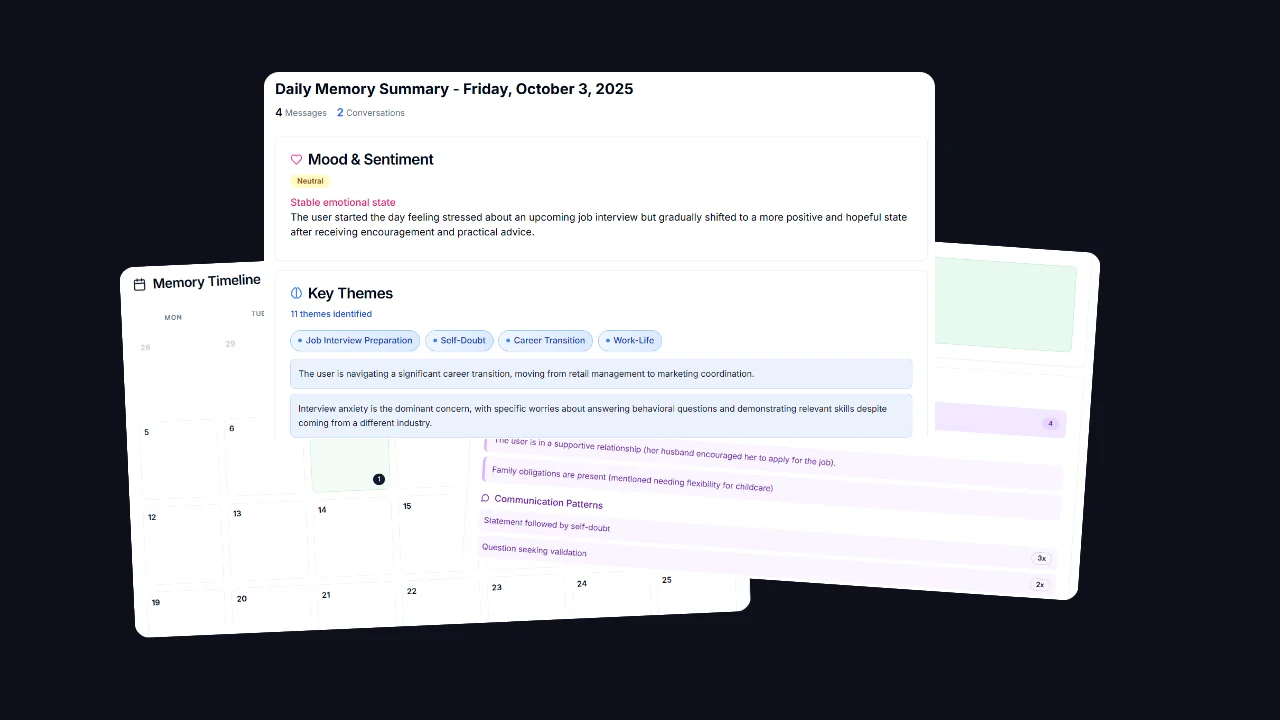
The useful distinction is between evidence and synthesis. A dated conversation excerpt is evidence that something was said. “Career transition is the dominant concern” is a synthesis. It may be helpful, but the user should be able to challenge it, especially if important context happened outside Gemora.
When using a summary:
- Check whether the named dates and events are accurate.
- Separate direct statements from inferred themes.
- Correct a conclusion that is too broad or no longer current.
- Keep only the synthesis that helps a present decision.
Gemora should not diagnose mental health, infer sensitive traits, or treat a retrieved memory as permission to expose private context. The current chat rules explicitly restrict raw memory dumps, hidden metadata, internal IDs, and unnecessary personal detail.
Limits you should understand before relying on memory
Gemora memory is not a perfect autobiographical record. It only has access to information shared with or connected to the product. It can miss offline events, misunderstand a sentence, compress nuance, or retrieve a technically similar but practically irrelevant memory.
Availability also changes. A capability visible in backend code may be gated by configuration, feature flags, subscription tier, client implementation, or staged rollout. This article therefore describes verified architecture and available control categories, not a guarantee that every button appears for every user today.
Semantic indexing is best-effort. The canonical-first design protects recoverability, but an unindexed record may not be found through semantic retrieval until the index is repaired or refreshed. Conversely, removing a canonical record should be followed through to any derived or indexed representation used in the active path.
Personalization can also become over-personalization. A preference that improves project updates may be distracting in a casual conversation. Gemora’s prompts prioritize current explicit instructions and tell the model to use personal context only when it earns its place. Prompt rules reduce risk; they do not eliminate model error.
For legal details about collection, retention, and deletion, the current Privacy Policy and Data Deletion Policy are authoritative over this educational explanation.
A five-minute audit for one harmless memory
Choose a fictional, non-sensitive detail: “Project Cedar status notes should begin with the decision.”
- Save: state the preference explicitly and ask whether it became durable memory.
- Inspect: locate the record where that surface is available. Check wording, scope, source, and lifecycle.
- Retrieve: start a clean conversation and ask for a Project Cedar status note without repeating the preference.
- Correct: change “decision first” to “risk first,” then verify that a new clean conversation follows only the correction.
- Delete: remove the test memory and confirm it no longer changes a later answer.
Write down the observed result at each stage. If the UI does not expose a stage, record that as a product limitation rather than assuming what happened internally.
The broader explanation of external memory, context windows, and retrieval is in What Is Long-Term Memory in AI?. The AI with memory solution page shows where this architecture appears in the product experience. The standard for Gemora is not that it sounds as if it knows you. The standard is that useful continuity remains selective, inspectable, correctable, scoped, and forgettable.
Continue the thread
Test Gemora memory with its controls visible
Save a harmless preference, inspect how it appears in Memory Timeline, correct it, and verify deletion before trusting the workflow with sensitive context.
Start freeFrequently asked questions
Does Gemora use one memory database?
The codebase supports layered and routed memory paths, including Firestore and Mem0-backed behavior depending on mode and configuration.
Does every Gemora message become memory?
No. Conversation data and durable memory are distinct, and capture behavior depends on the workflow and settings.
Can Gemora memory be wrong?
Yes. Derived, stored, and retrieved context can be incomplete or stale, so users should review and correct important items.
Sources and further reading
Written by Khai Tran and reviewed under the Gemora Editorial Policy.