how to make AI remember you across conversations
How to Make AI Remember You Across Conversations: A Practical System for 2026
Learn a practical system for helping AI remember useful context across conversations through durable memory, retrieval, updates, projects, and portable notes.
Metodología: The workflow combines current official memory controls with a provider-independent context-card and retrieval process.
Contribución original: A portable four-layer system for durable preferences, changing situations, exact-history retrieval, and dated updates.

En esta guía
- The fastest answer: use the 4-layer memory system
- Step 1: decide what deserves long-term memory
- Step 2: make durable context explicit
- Step 3: keep stable preferences separate from changing situations
- Step 4: tell the AI when something changes
- Step 5: use a stable project space for long-running work
- Step 6: use retrieval when you need exact history
- Step 7: give the AI retrieval cues
- Step 8: verify the context before a high-value answer
- Step 9: audit memory occasionally
- How to make ChatGPT remember you across conversations
- How to make Claude remember you across conversations
- How to make Gemini remember you across conversations
- How to make Pi remember you across conversations
- The best universal solution: create a portable Personal Context Card
- Privacy: memory should be permissioned, not maximal
- Can one AI remember you across all models?
- Where Gemora fits
- A complete setup you can use today
- Final answer
Related reading: memory vs history · apps with recall · long-term assistants · memory controls.
The goal is not to make AI remember every sentence. It is to keep enough useful context that the next conversation does not have to begin from zero. Source: Gemora.
If you use AI regularly, there is a point where repeating yourself becomes ridiculous.
You explain what you are building.
Again.
You explain who someone is.
Again.
You explain that the deadline moved.
Again.
You explain that you prefer short answers, that the project is Android-first, that you already tried the obvious solution, that you are not asking about the old plan anymore, and that “Sam” is the same Sam you mentioned twelve conversations ago.
Eventually the problem is no longer:
“Can AI answer my question?”
It is:
“Can AI understand enough of the context around me that I do not have to reconstruct it every time?”
In 2026, the answer is increasingly yes.
ChatGPT now maintains a continuously updated memory synthesis across past chats and other supported sources.
Claude stores editable memory topics, searches previous chats, and can import memory from another AI provider.
Gemini can use past conversations for personalization and can import both memory summaries and full chat-history exports from other AI services.
Pi remembers durable personal context across chats.
And specialized personal AI products increasingly organize conversation around continuity rather than treating every session as an isolated prompt.
But there is still a catch:
AI memory works much better when you use it deliberately.
The best setup is not:
“Remember everything I ever say.”
It is a simple system:
1. Keep stable facts explicit
2. Keep active situations current
3. Keep long-running work in a stable context space
4. Use retrieval when exact history matters
5. Correct old context when reality changes
6. Move important context with you when you switch AI
This guide shows exactly how to do that.
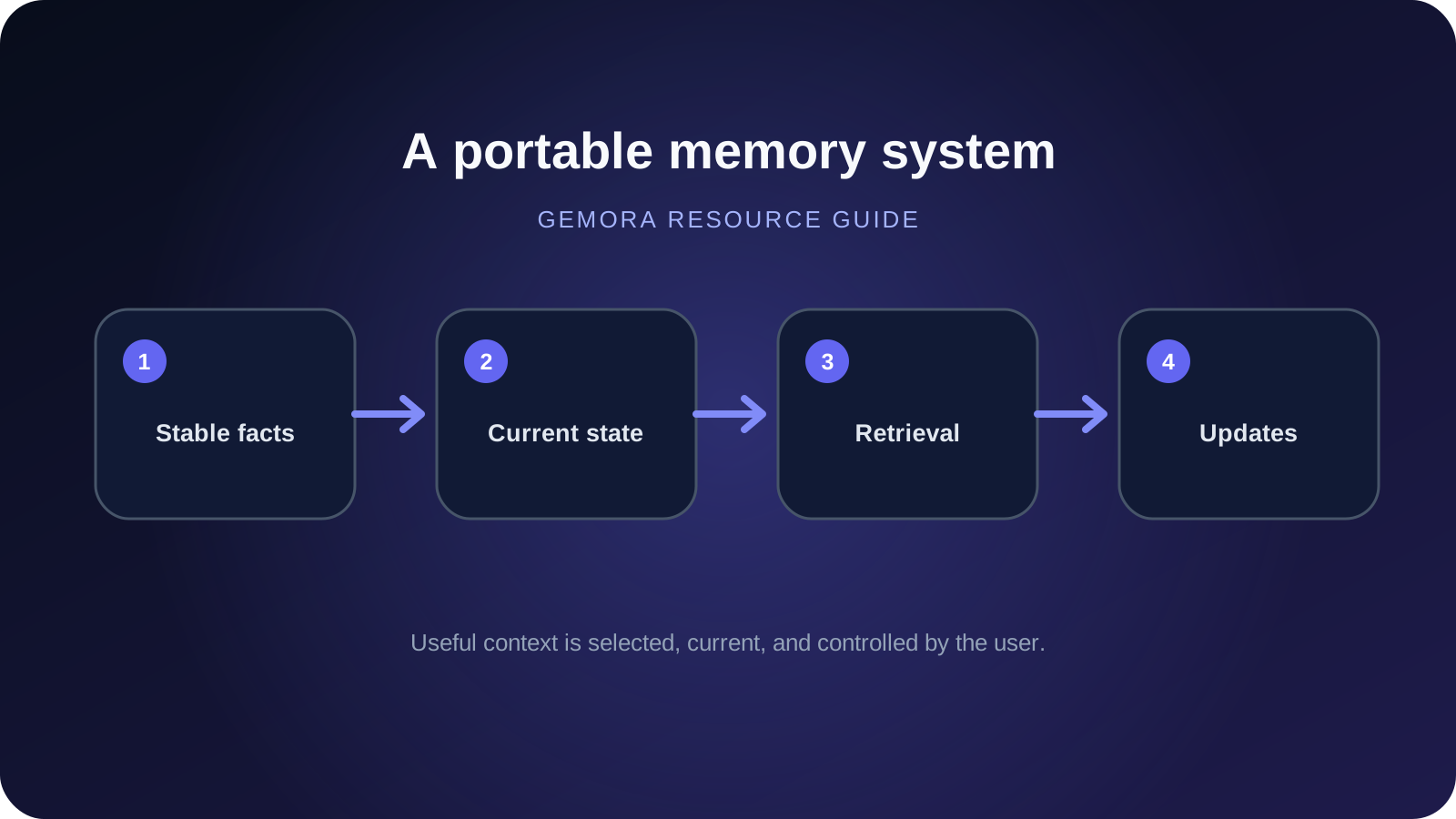
The fastest answer: use the 4-layer memory system
If you do nothing else, organize AI context into four layers.
Layer 1: Stable context
Things likely to remain true for months.
Examples:
- your role,
- communication preferences,
- important recurring constraints,
- languages,
- tools you use,
- durable preferences.
Example:
“I am a solo founder building a consumer AI product. For technical questions, give me the short practical answer first, then detail if needed.”
Store this in:
- AI memory,
- Custom Instructions,
- explicit profile context,
- or an equivalent durable setting.
Layer 2: Active context
Things that matter now but will change.
Examples:
- current launch,
- job search,
- trip,
- relationship situation,
- active goal,
- temporary problem,
- current decision.
Example:
“The Android app is in closed testing. The current priority is production approval, onboarding quality, and distribution.”
This should be updated when circumstances change.
Do not treat temporary state as an eternal personality trait.
Layer 3: Source history
The original conversations, files, notes, or project history.
Use this when you need:
- exact wording,
- an old decision,
- the original reasoning,
- or details too specific to keep in summary memory.
This is where chat search matters.
Layer 4: Portable context
A compact summary you control and can move between AI products.
Example:
Current context
- Building: consumer AI app
- Stage: early distribution
- Current priorities: launch, user acquisition, retention
- Working style: concise first, practical, direct
- Important ongoing decisions: distribution vs fundraising
- Recently changed: production launch is now higher priority
This layer protects you from rebuilding everything when you switch models.
That four-layer system is much more reliable than hoping one giant magical memory feature remembers everything perfectly forever.
Why “remember everything” is the wrong goal
It sounds ideal:
An AI that never forgets.
Until you think about what that means.
Do you want an AI permanently preserving:
- every temporary mood,
- every half-finished idea,
- every joke,
- every hypothetical,
- every person you mentioned once,
- every preference you later changed,
- every plan you abandoned?
Probably not.
Imagine telling an AI in January:
“I think I want to move abroad.”
Then deciding in March:
“Actually, I want to stay near my family.”
A system that “never forgets” may now carry both statements forever.
The useful system understands:
Historical preference:
Considered moving abroad.

Current preference:
Staying near family matters more.

Last updated:
March.
That is why good AI memory requires:
- selection,
- updating,
- retrieval,
- time,
- and deletion.
Not infinite storage.
Step 1: decide what deserves long-term memory
Before configuring any AI app, decide which information should remain useful across conversations.
A practical rule:
Store information if knowing it later would materially improve several future answers.
Good long-term context includes:
Communication preferences
Examples:
“Give the conclusion first.”
“Use examples instead of abstract explanations.”
“Do not repeat background I already understand.”
“Use Vietnamese for internal planning and English for global copy.”
These are durable and broadly useful.
Persistent work or study context
Examples:
“I am building an Android-first consumer app.”
“I am studying computer science.”
“I work primarily with React and TypeScript.”
Important constraints
Examples:
“I cannot relocate this year.”
“I have a limited monthly budget.”
“I am working solo.”
Recurring goals
Examples:
“My main goal this year is getting the product to consistent user retention.”
People who repeatedly matter
Only when appropriate and useful.
Examples:
“Sam is my designer.”
“Alex is my cofounder.”
Relationship context can be useful, but it can also be sensitive. Do not treat maximum personal detail as a personalization competition.
What should usually not become durable memory?
Examples:
“I am tired today.”
“I want pizza tonight.”
“I might buy a new phone.”
“Imagine I move to Tokyo.”
“For this roleplay, I am a detective.”
“I am annoyed with my manager right now.”
These may matter inside the current conversation.
They should not automatically become permanent truths.
Pi's current memory documentation explicitly describes this philosophy: it focuses on information likely to remain useful for months, such as work, interests, goals, routines, and communication preferences. (Pi Help Center)

Pi deliberately focuses memory on durable context rather than preserving every one-off comment. Source: Pi.
Step 2: make durable context explicit
AI can infer memory automatically.
Important context should not depend entirely on inference.
If something genuinely matters later, say so.
Use language such as:
“Remember this for future conversations.”
“Keep this as ongoing context.”
“This is a stable preference unless I tell you otherwise.”
“Update your understanding of this project to the following.”
“This is the current version. The old version is outdated.”
This helps the system distinguish:
durable fact
from
something you happened to say once.
Better memory statements are concise
Weak:
“So basically last week I was thinking about distribution and I talked to three people and then I started wondering whether maybe fundraising is too early…”
Better durable context:
“Current strategy: prioritize distribution and user validation before spending significant time fundraising.”
The second statement is easier to preserve and reuse.
Step 3: keep stable preferences separate from changing situations
This is one of the easiest improvements you can make.
Do not mix:
who I usually am
with
what is happening right now.
For example:
Stable
I prefer concise answers.
I am a solo founder.
I usually want practical recommendations rather than neutral lists.
Active
The app is currently in closed testing.
Production launch is the immediate priority.
This month I am testing distribution channels.
The active section should change.
The stable section should change much less often.
If you put everything into one permanent profile, stale information accumulates.
Step 4: tell the AI when something changes
This is the habit most users skip.
They update reality.
They forget to update the AI.
Then six weeks later:
“Why does this thing keep talking about the old plan?”
Because the old plan is the last durable version it received. Shocking behavior from a database.
Use explicit updates.
For example:
“Update this: production launch moved from September 15 to October 1.”
“My priority has changed. Distribution now matters more than fundraising.”
“Forget the previous goal. I am no longer trying to move.”
“Sam is no longer involved in the project.”
“This preference is outdated.”
Modern memory systems are increasingly designed to update automatically, but explicit correction is still valuable.
OpenAI's current Memory FAQ says ChatGPT's newer system automatically updates its synthesis from chats and allows direct corrections in the Memory Summary. citeturn669599view3

ChatGPT's Memory Summary can be corrected directly when context becomes outdated. Source: OpenAI.
Claude goes further in visibility by exposing individual memory topics that can be edited or deleted.

Claude exposes remembered context as Topics, making updates easier to audit. Source: Anthropic.

Individual Claude memory topics can be edited or deleted when reality changes. Source: Anthropic.
Step 5: use a stable project space for long-running work
Global memory should not carry every detail of every project.
That creates context pollution.
A better pattern is:
Global memory:
Who I am + broad preferences

Project context:
Everything specific to this project
For example:
Global
“I am a solo founder and prefer practical, concise recommendations.”
Product launch project
“Current release status, store requirements, onboarding issues, distribution plan, launch timeline.”
Fundraising project
“Pitch narrative, investor list, traction numbers, fundraising strategy.”
These are separate contexts.
That means asking about launch does not require dragging every investor conversation into the prompt.
Claude
Claude supports project-oriented context and also allows memory to build across chats and Cowork.
Anthropic's current memory documentation says the same memory works across Chat and Cowork, while project context can keep workstreams more coherent. (Anthropic)

Claude can carry useful context across conversations while still supporting structured work contexts. Source: Anthropic.
ChatGPT
OpenAI also documents Project-only memory in supported configurations, which limits context to conversations inside a specific project instead of allowing it to flow globally. citeturn669599view3
This is often better than one global memory for everything.
Step 6: use retrieval when you need exact history
Long-term memory is compressed.
Sometimes you need the original discussion.
Do not ask memory to do search's job.
You need memory when:
“Remember that I prefer concise technical explanations.”
“Know that this launch is my current priority.”
You need retrieval when:
“Find the exact conversation where we decided to delay launch.”
“What reasons did I give last month for rejecting option B?”
“Show me what we discussed about the onboarding flow.”
These are source-history questions.
Claude is particularly strong here
Anthropic's current help documentation says paid users can ask Claude to search previous conversations and reference relevant information in a new chat. citeturn187744search5
Useful prompts:
“Search our previous chats about the launch date before answering.”
“Find where we discussed this decision and summarize the reasoning.”
“Continue from the last conversation about onboarding.”
Gemini can also reference past chats
Google says users with Memory and Keep Activity enabled can ask Gemini about previous conversations by topic or timeframe. citeturn187744search12
Examples:
“Summarize our previous discussions about this trip.”
“What did we decide about the gift?”
ChatGPT combines memory with history search
ChatGPT supports chat-history search and can also use past chats as part of its broader memory synthesis.
The practical rule remains:
Need continuity? Memory.
Need evidence? Search history.
Step 7: give the AI retrieval cues
Even with excellent memory, vague references are difficult.
Compare:
“What do you think now?”
with:
“Use our previous conversations about whether I should leave my job before answering.”
The second version gives the retrieval system a topic anchor.
You are not repeating the story.
You are pointing to the correct shelf.
Useful cues include:
“Use our previous discussions about X.”
“This continues the situation with Y.”
“Search the chat where we decided Z.”
“This is about the launch plan we discussed last week.”
“Use the latest context, not the older version.”
These short cues often produce a much better result than writing a giant replacement prompt.
Step 8: verify the context before a high-value answer
For important questions, do not blindly assume the AI retrieved the correct version of your history.
Ask it to show its working context first.
For example:
“Before answering, summarize the relevant context you believe is currently true.”
Then check:
- Did it retrieve the correct project?
- Is the deadline current?
- Did it misunderstand a person?
- Is an old goal still being treated as current?
- Is anything critical missing?
Only then ask for the recommendation.
This tiny step dramatically improves reliability for:
- strategic decisions,
- long-running projects,
- travel,
- financial planning,
- personal reflection,
- and complicated life situations.
Step 9: audit memory occasionally
Memory quality degrades if nobody maintains it.
You do not need to obsessively curate every fact.
A quick audit once a month is enough for many users.
Ask:
“What do you currently remember about me?”
Then look for three things.
Wrong
Example:
“You prefer detailed answers.”
when you do not.
Fix it.
Outdated
Example:
“You are preparing for the October launch.”
after launch already happened.
Update it.
Irrelevant
Example:
A temporary preference is now being used everywhere.
Remove it.
The goal is not a large memory profile.
It is a clean memory profile.
How to make ChatGPT remember you across conversations
ChatGPT currently has one of the strongest automatic memory systems among general-purpose AI products.
OpenAI's latest Memory FAQ says enabled memory can automatically use useful context from:
- chats,
- files,
- memories,
- and supported connected apps
to personalize later responses. citeturn669599view3
Here is the practical setup.
ChatGPT Step 1: turn Memory on
Go to:
Settings → Personalization → Memory
If memory is newly enabled, do not panic if the Memory Summary is still sparse.
OpenAI says new accounts, recently enabled accounts, or accounts without enough chat history may need time before a useful summary appears. citeturn669599view3
ChatGPT Step 2: put explicit durable instructions in Custom Instructions
OpenAI distinguishes between:
Custom Instructions
and
Memory.
Custom Instructions are better for deliberate stable guidance.
Examples:
I prefer concise answers with the recommendation first.
Use metric units.
When comparing options, make a recommendation instead of staying completely neutral.
Memory is better for useful context learned through conversation.
Do not ask automatic memory to infer everything that could have been a one-line explicit instruction.
ChatGPT Step 3: explicitly save high-value durable context
Even though the new system learns automatically, important facts can still be made explicit.
Say:
“Remember that I am building an Android-first consumer AI app.”
“Remember that this year's main goal is user retention before fundraising.”
“Remember that I prefer short answers unless I ask for detail.”
OpenAI's legacy Saved Memories workflow also supports explicit memory, and the broader 2026 memory system continues to synthesize context automatically. citeturn669599view3
ChatGPT Step 4: review the Memory Summary
The Memory Summary gives users a high-level view of the context ChatGPT has synthesized. Source: OpenAI.
OpenAI says the Memory Summary does not necessarily show every factor ChatGPT may know from past chats.
So if you want to verify a specific fact, ask:
“Do you remember X?”
ChatGPT Step 5: use Memory Sources to debug personalization

ChatGPT can show some of the memories, past chats, custom instructions, files, or connected sources behind a personalized response. Source: OpenAI.
If ChatGPT gives a strangely personalized answer, inspect the sources.
Maybe it used:
- an old chat,
- a stale memory,
- an irrelevant file,
- or a connected source you did not expect.
Correction becomes easier when you know where the context came from.
ChatGPT Step 6: use regular chats for things you want remembered
Temporary Chat is designed for one-off conversations.
OpenAI's current Temporary Chat FAQ says Temporary Chats start non-personalized by default.
A personalized Temporary Chat can use existing memory, but while it remains temporary it does not create or update memory. citeturn187744search0
So if something should become durable context:
do not leave it trapped inside an unsaved Temporary Chat.
ChatGPT Step 7: update old context explicitly
Examples:
“Update my launch date to October 1.”
“The fundraising plan is paused. Distribution is now the priority.”
“Do not treat the previous pricing idea as current.”
OpenAI's new system is designed to refresh memory automatically, but explicit correction remains useful.
ChatGPT Step 8: ask for relevant past context before important decisions
Use:
“Before answering, use the relevant context from my previous chats and memory. Summarize what you are using first.”
This gives you a quick audit before the answer.
How to make Claude remember you across conversations
Claude's strongest advantage is visibility.
Instead of only relying on an invisible synthesized profile, Anthropic exposes remembered information as individual Topics.
Memory is currently available across Free, Pro, Max, Team, and Enterprise experiences, though organizational defaults can differ. Anthropic's August 2026 release notes say memory is on by default for Free, Pro, and Max and off by default for Team and Enterprise organizations. citeturn187744search8
Claude Step 1: open Settings → Memory
You can inspect everything Claude has organized into Topics.
Claude's Topics interface is one of the clearest ways to inspect persistent AI context. Source: Anthropic.
This is your memory dashboard.
Use it.
Claude Step 2: correct memory directly
If Claude remembers the wrong thing, edit the Topic.
Claude lets users directly edit or delete individual remembered topics. Source: Anthropic.
This is particularly useful for:
- deadlines,
- project roles,
- current priorities,
- changed decisions.
Claude Step 3: use past-chat search when exact history matters
On paid plans, Claude can search previous conversations directly. citeturn187744search5
Try:
“Search our previous chats for the last time we discussed this.”
“Find the original reasoning behind this decision.”
“Use our previous conversation about the launch before giving me a new plan.”
This is much stronger than hoping a compressed memory contains every detail.
Claude Step 4: use project spaces for separate workstreams
Keep unrelated contexts separate.
For example:
Project: Gemora launch
Project: Fundraising
Project: University
Project: Personal writing
This keeps “remember me” from becoming “mix every part of my life together.”
Claude Step 5: import memory when switching from another AI
Anthropic now supports memory imports on Free, Pro, Max, and Team plans on web and Claude Desktop. citeturn187744search3
The flow:
- Ask the previous AI to summarize relevant memory.
- Open Settings → Memory → Start import.
- Paste the exported context.
- Claude extracts memory entries.
- Review what it learned.

Claude's import workflow lets users move useful context from another AI provider. Source: Anthropic.

Imported context becomes reviewable memory rather than remaining an opaque pasted prompt. Source: Anthropic.
One important caveat:
Anthropic currently says Claude's memory is designed primarily around work-related topics, so imported personal details unrelated to work may not always be retained automatically. citeturn187744search3
If a personal detail genuinely matters, add it explicitly.
Claude Step 6: be deliberate with sensitive topics
Anthropic separates sensitive memory categories.
If you expect continuity around sensitive personal topics, understand the setting rather than assuming Claude will automatically retain everything.
The default is intentionally more conservative.
How to make Gemini remember you across conversations
Gemini's memory setup is powerful but more conditional than ChatGPT's or Claude's.
Google currently requires all of the following for past-chat memory:
- age 18+,
- a personal Google Account,
- Keep Activity enabled.
It is not available on work, school, or supervised Google Accounts. citeturn187744search6
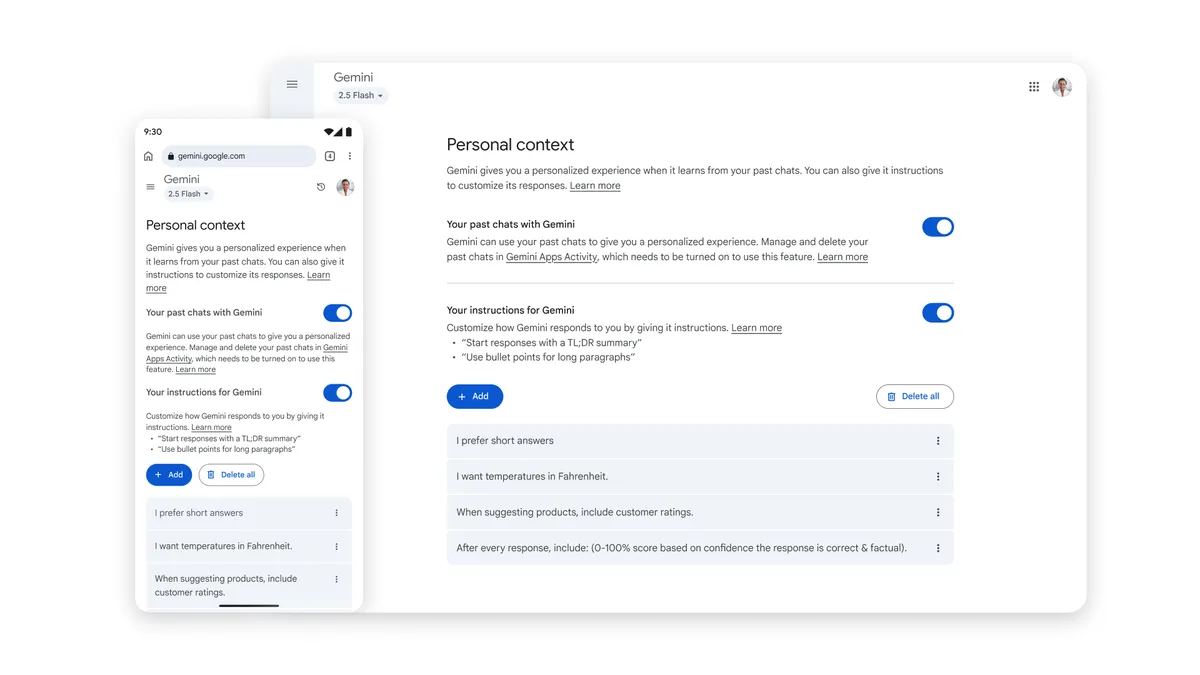
Gemini Step 1: check Memory and Keep Activity
If Gemini seems forgetful, start here.
Gemini Personal Context settings for past chats (source image)
Gemini's ability to personalize from past chats depends on Personal Intelligence / Memory settings and account eligibility. Source: Google.
Do not assume:
“I can see my old chats, therefore Gemini memory is active.”
These are separate concepts.
Gemini Step 2: make sure you are in a supported mode
Google says memory from past chats is currently available in supported:
- Gemini mobile,
- Gemini web,
- Gemini in Chrome in supported countries,
- and smartwatch experiences.
It is not available directly in certain experiences such as Gems or Live chats. citeturn187744search6
If continuity is critical, use a supported surface.
Gemini Step 3: explicitly ask Gemini to use past chats
Google supports natural queries about prior conversations. citeturn187744search12
Examples:
“Use our past chats about this project before answering.”
“What did we decide about this last month?”
“Summarize what I have previously told you about my travel preferences.”
This gives Gemini a clear retrieval task.
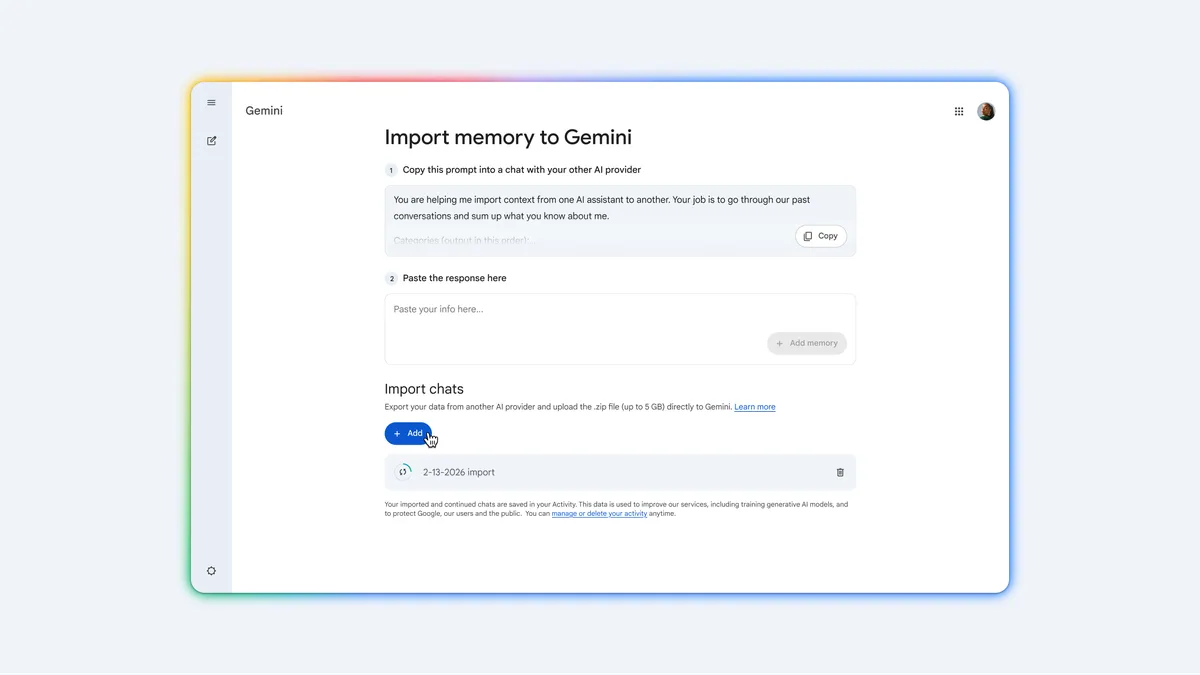
Gemini Step 4: import memory from another AI
Gemini currently has one of the strongest migration flows among consumer AI products.
Google lets users import:
- preferences,
- remembered facts,
- personal context,
- and full chat history from another AI service. citeturn187744search7
Gemini Import Memory interface (source image)
Gemini can import a structured summary of context from another AI platform. Source: Google.
The memory import process is useful when switching from ChatGPT, Claude, or another AI without wanting to re-explain your background manually.
Gemini Step 5: import your full chat history when source detail matters
Gemini Import Chat History interface (source image)
Gemini can import full chat-history exports from other AI providers so users can search and continue older conversations. Source: Google.
Google's current help documentation says users can upload a full history export and continue conversations from another platform inside Gemini. citeturn187744search7
This is stronger than importing only a summary.
Why?
Because you preserve both:
derived memory
and
source history.
Gemini Step 6: remember that Temporary Chats do not build future continuity
Use Temporary Chat when you deliberately do not want a conversation to become part of normal history or personalization.
For ongoing context, use a normal chat.
How to make Pi remember you across conversations
Pi takes a simpler approach.
It remembers information it expects to remain useful across months, such as:
- interests,
- work,
- study,
- goals,
- communication preferences,
- routines,
- family context with permission.
Source: Pi's Memory
Pi Step 1: tell it explicitly when something matters
Use:
“Remember that…”
Pi's own help center says users may sometimes need to repeat the request to lock a memory in reliably. citeturn187744search2
Pi Step 2: keep the memory durable
Good:
“I am building a company.”
Less useful as permanent memory:
“I have a meeting tomorrow at 2.”
Pi is intentionally selective.
Work with the design rather than fighting it.
Pi Step 3: manage memory in settings
Review, edit, or clear memories periodically.
Pi's simpler design makes it useful for people who want conversational continuity without a complicated project-memory system.

Pi combines conversational memory with voice, making persistent context useful without requiring a formal workspace. Source: Pi.
The best universal solution: create a portable Personal Context Card
No matter which AI you use, maintain one compact Markdown context file that you control.
Call it:
personal-context.md
Do not put every detail of your life inside it.
Keep it useful.
Here is a strong template.
 # Personal Context

Last updated: 2026-09-04

 ## About me
- Role:
- Location:
- Main areas of focus:
- Languages:

 ## How I prefer AI to help
- Response style:
- Decision style:
- Things to avoid:
- When to ask questions:

 ## Current priorities
1.
2.
3.

 ## Active situations
 ### Project / situation 1
- Current state:
- Goal:
- Main constraint:
- Recent change:
- Next decision:

 ### Project / situation 2
- Current state:
- Goal:
- Main constraint:
- Recent change:
- Next decision:

 ## Important recurring people
- Name:
  - Relationship / role:
  - Relevant context:

 ## Stable preferences
-
-
-

 ## Recently changed
- Old:
- New:
- Changed on:

 ## Things that are no longer true
-
-

 ## Context I do NOT want carried forward
-
This file has three advantages.
1. Portability
You can provide it to:
- ChatGPT,
- Claude,
- Gemini,
- another model,
- or a future AI app.
2. Auditability
You can read exactly what context you are giving the model.
3. Recovery
If one provider loses or resets memory, you are not back at zero.
Do not turn the Context Card into a 40-page autobiography
Keep it compact.
A useful context file is not:
“Everything about me.”
It is:
“The minimum durable context that improves many future conversations.”
A good target is:
500–1,500 words for a general personal context card.
Large projects can have their own files.
For example:
personal-context.md
gemora-product-context.md
fundraising-context.md
university-context.md
This is cleaner than one mega-prompt describing your entire existence since childhood.
Use “current state” summaries for active projects
For long-running work, maintain a small summary like:
 # Current State: Gemora Launch

Updated: September 4, 2026

 ## Goal
Publish Android production version and validate distribution.

 ## Current status
- Closed testing active
- Production preparation underway
- Web product live

 ## Immediate priorities
1. Production readiness
2. Crash and performance cleanup
3. Distribution
4. Retention measurement

 ## Important decisions
- Distribution before serious fundraising
- Do not position product as only a memory app

 ## Current risks
- Low distribution
- Weak early retention signal
- Overbuilding before validation

 ## Next milestones
- Production launch
- First organic acquisition loop
- Retention baseline
This is enormously useful.
Instead of asking memory to reconstruct every old conversation, the AI gets a clean state snapshot.
The update rule: facts need dates
One of the strongest habits for persistent context is adding:
Last updated
or:
Valid until
to temporary context.
Example:
Current goal:
Launch Android production version.

Last updated:
September 4, 2026.

Status:
Active.
Later:
Status:
Completed October 2, 2026.
Now the AI can preserve the history without treating the old goal as current forever.
This is the difference between:
memory
and
timeline-aware context.
Use explicit status labels
For anything likely to change, use one of:
CURRENT
PAUSED
COMPLETED
CANCELLED
HISTORICAL
UNCERTAIN
Example:
Fundraising
Status: PAUSED

Reason:
Distribution and retention validation have priority.
This prevents:
“You told me fundraising was a goal.”
from silently becoming:
“Fundraising is still your current priority.”
Keep decisions and reasons together
AI becomes more useful when it remembers not only what you decided, but why.
Weak memory:
“Decided not to raise yet.”
Better:
Decision:
Do not prioritize fundraising yet.

Reason:
Current validation and distribution are too early.

Revisit when:
Retention and repeat usage become clearer.
Later, the AI can ask:
“Has the condition that caused the original decision changed?”
That is much better than blindly repeating an old conclusion.
Add “revisit when” to temporary decisions
This is one of the most powerful fields for AI context.
Example:
Decision:
Do not hire yet.

Reason:
Still validating acquisition.

Revisit when:
Organic acquisition reaches a repeatable baseline.
Now the AI knows:
- the decision,
- the reasoning,
- and the condition that should trigger reconsideration.
That turns memory into something closer to a living decision system.
Keep raw history and summaries separate
Do not destroy source history after creating summaries.
A good architecture is:
Raw chats
↓
Summaries
↓
Current state
↓
AI response
Why keep raw history?
Because summaries can be wrong.
They compress nuance.
If a later question needs detail, the AI should be able to retrieve the original conversation.
This is exactly why Claude's chat search and Gemini's imported chat-history features matter.
When switching AI providers, move context in two forms
If possible, move both:
1. Summary
Your current context.
Fast and efficient.
2. Source archive
Your old chats.
Slower, but preserves history.
Gemini now explicitly supports both memory import and full chat-history import. citeturn187744search7
Claude supports memory import and export. citeturn187744search3
This is the beginning of context portability.
How to create a memory export prompt
If your current AI does not have a formal export workflow, use this prompt:
Create a portable personal-context summary from our conversations.

Only include information that would materially improve future AI conversations.

Organize it into:

1. Stable personal context
2. Communication preferences
3. Current goals
4. Active projects and situations
5. Important people and relationships
6. Important decisions and why they were made
7. Recently changed information
8. Things that are no longer true
9. Recurring themes or preferences
10. Sensitive details that should NOT be included unless absolutely necessary

For every time-sensitive item, include:
- current status
- approximate date
- whether it is current, historical, uncertain, completed, or cancelled

Do not invent facts.
Do not infer sensitive personal traits.
Keep the output concise and portable in Markdown.
Then review it manually.
Do not blindly import a generated biography into another system.
AI can summarize your context incorrectly too.
The best workflow when starting with a new AI
When you move to a new assistant, do this.
Step 1
Import or paste your compact Personal Context Card.
Step 2
Import project summaries.
Step 3
Import full history only if the product supports useful retrieval.
Step 4
Ask:
“Summarize what you now understand about me. Separate stable facts, current situations, and uncertain assumptions.”
Step 5
Correct mistakes immediately.
Step 6
Use the assistant normally.
Do not spend four hours pre-configuring every imaginable detail.
Memory should grow with use.
Use a monthly memory review
Once per month, ask:
“Review the context you currently have about me and classify it into:
- current
- outdated
- uncertain
- duplicated
- not useful.”
Then make corrections.
This is much better than waiting until stale context starts producing bizarre answers.
A five-minute monthly cleanup can prevent months of quiet personalization drift.
What not to put into global AI memory
Some information deserves strict boundaries.
Avoid globally carrying:
- passwords,
- authentication secrets,
- API keys,
- security answers,
- highly sensitive personal records,
- confidential client information without appropriate controls,
- information you only need for one temporary task.
A personal context layer should be selective.
More data is not automatically better.
Privacy: memory should be permissioned, not maximal
The best AI memory setup is not:
“Give every AI everything.”
It is:
“Give this AI the context relevant to this role.”
For example:
Coding assistant
Needs:
- stack,
- repo context,
- architecture,
- coding preferences.
Does not need:
- personal relationship history.
Travel assistant
Needs:
- budget,
- travel preferences,
- dates,
- location constraints.
Does not need:
- fundraising strategy.
Personal reflection assistant
May need:
- relevant conversations,
- people,
- goals,
- changing life context.
Does not automatically need:
- every work file.
This is the logic of a personal context layer.
For a deeper explanation, see:
What Is a Personal Context Layer for AI?
Can one AI remember you across all models?
Not cleanly yet.
Most memory is still provider-specific.
The normal situation is:
ChatGPT memory → ChatGPT

Claude memory → Claude

Gemini memory → Gemini
Users therefore end up with multiple fragmented versions of themselves.
Gemini's memory and chat-history import and Claude's memory import/export are meaningful improvements.
But the industry still lacks one universal live personal-context standard.
The larger future direction is:
Your context
     ↓
User-controlled layer
     ↓
ChatGPT / Claude / Gemini / other models
You choose which model gets which part.
That is much more powerful than one model owning your only useful memory profile.
Where Gemora fits
Gemora is centered on a slightly different problem.
The goal is not:
“Make the database remember more facts.”
It is:
“Make conversations about your life connect well enough that you can keep going.”
You may talk about:
- people,
- decisions,
- goals,
- stress,
- work,
- study,
- relationships,
- trips,
- ordinary days,
- or things you keep returning to.
The useful context is not always a durable profile field.
Sometimes it is a thread.
For example:
Week 1: “I think I should quit.”
Week 3: “Maybe the job itself is not the problem.”
Week 5: “I realized I want more autonomy.”
Week 8: “I finally made a decision.”
A conventional memory list might preserve:
“User considered quitting job.”
That loses most of the story.
The more interesting context is how the thinking changed.

Gemora Recap makes it easier to revisit previous days and conversations as parts of a continuing life rather than isolated chat sessions. Source: Gemora.
Past context should be easy to return to

Gemora Memories is designed around resurfacing relevant personal context instead of forcing users to manually reconstruct every old conversation. Source: Gemora.
The goal is understanding change

Longitudinal context becomes valuable when it helps users notice changes and recurring patterns across time. Source: Gemora.
That is why Gemora's long-term direction is not “memory as storage.”
It is:
conversation → continuity → reflection → better understanding.
You should not have to explain your life again every time you open a new chat. Gemora is built around conversations staying connected enough that the next one can start further ahead. Start talking with Gemora.
A complete setup you can use today
Here is a simple system that works across most modern AI products.
One-time setup
1. Enable memory
Turn on the product's relevant memory or personalization settings.
2. Add stable instructions
Store:
- response preferences,
- role,
- long-term constraints.
3. Create Personal Context Card
Keep a portable personal-context.md.
4. Create separate project context files
One for each major long-running area.
Every conversation
5. Speak naturally
Do not micromanage memory after every message.
6. Explicitly mark important durable updates
Use:
“Keep this as ongoing context.”
7. Correct stale information immediately
Use:
“Update the old version.”
Before important answers
8. Ask for context first
Use:
“Summarize the context you are using before answering.”
9. Give a retrieval cue
Use:
“Use our previous conversations about X.”
Monthly
10. Audit memory
Remove:
- stale context,
- wrong assumptions,
- irrelevant information.
Update:
- priorities,
- deadlines,
- status.
Export:
- a fresh portable context summary.
That is it.
Persistent AI context does not require building a personal data center in your basement.
A reusable “remember me” prompt
Use this in an AI that supports memory:
I want future conversations to build on useful context without carrying every temporary detail forward.

When something is likely to remain relevant for months, treat it as durable context.

When something is a temporary project, goal, plan, or situation:
- keep its current status
- note meaningful updates
- stop treating old states as current when I correct them

When I explicitly say:
- "remember this" → treat it as durable context
- "update this" → replace or revise the old version
- "this is historical" → keep it only as past context
- "forget this" → remove it where the product allows

Do not turn hypotheticals, jokes, roleplay, temporary emotions, or one-off statements into permanent personal facts.

When an important answer depends on my history:
1. retrieve the relevant previous context
2. prefer newer information over stale information
3. tell me if key context is uncertain
4. ask rather than invent missing facts
This does not magically override a product's memory architecture.
It gives the system clearer intent.
A reusable context-retrieval prompt
When continuing an old topic:
Before answering:

1. Search or use the relevant context from our previous conversations about [TOPIC].
2. Summarize what you believe is currently true.
3. Separate:
   - current facts
   - historical facts
   - unresolved questions
   - anything uncertain
4. Do not use outdated information if a newer update exists.
5. Then answer my current question.
This is one of the best ways to reduce “you forgot what I told you” failures.
A reusable update prompt
When circumstances change:
Update my context for future conversations:

Old:
[OLD INFORMATION]

New:
[NEW INFORMATION]

Status:
[CURRENT / COMPLETED / PAUSED / CANCELLED / HISTORICAL]

Changed:
[DATE OR APPROXIMATE TIME]

Reason:
[WHY IT CHANGED]

Do not treat the old version as my current state, but preserve it as history if that history could still be relevant.
That last sentence matters.
You usually want to replace the current state without erasing the history.
How to test whether your setup actually works
Do not use a meaningless secret word.
Test real continuity.
Day 1
Tell the AI:
“I am launching an Android app next month. The biggest issue is onboarding.”
Day 2
Add:
“I prefer concise technical explanations.”
Day 3
Add:
“Sam is helping me redesign onboarding.”
Day 4
Update:
“The launch moved back two weeks.”
Day 5
Open a fresh chat.
Ask:
“What should I prioritize before launch?”
The AI should ideally understand:
- Android app,
- onboarding,
- updated timeline.
Day 6
Ask:
“What was the biggest unresolved issue I told you about?”
Day 7
Ask:
“Summarize what you currently believe about the launch. Separate current state from history.”
Evaluate:
- accuracy,
- retrieval,
- freshness,
- correction,
- transparency.
That is a useful memory benchmark.
Common mistake 1: putting everything in Custom Instructions
Custom Instructions are good for durable guidance.
They are terrible as a constantly changing life database.
Do not maintain:
My launch is next Tuesday.
My current trip is...
The person I am talking to this week is...
Today's main blocker is...
inside one permanent instruction field.
Use project or active context for changing information.
Common mistake 2: expecting memory to preserve exact conversations
Memory is usually compressed.
If exact wording matters:
search the source chat.
This is particularly important for:
- legal wording,
- technical decisions,
- quotations,
- detailed planning,
- commitments,
- and multi-step reasoning.
Common mistake 3: never correcting the AI
If you let the AI repeatedly use an incorrect assumption, that error can become increasingly embedded in future conversation.
Correct early.
Common mistake 4: using Temporary Chat for important ongoing context
Temporary is for:
“Do not carry this forward.”
Normal memory-enabled conversation is for:
“This may matter later.”
Use the right mode.
Common mistake 5: importing memory without reviewing it
AI-generated memory summaries can contain:
- oversimplifications,
- outdated context,
- incorrect inference,
- too much personal detail.
Review before import.
Anthropic explicitly describes memory import as experimental and notes Claude may not always incorporate imported context perfectly. citeturn187744search3
Common mistake 6: storing outcomes without reasons
Weak:
“Decided to wait.”
Better:
“Decided to wait because retention is not validated. Revisit when repeat usage becomes clearer.”
Reasons make future context far more useful.
Common mistake 7: treating all context as equally private
Personal AI context can become extremely sensitive.
Use separation.
Not every assistant needs every part of you.
Final answer
If you want AI to remember you across conversations, do not depend on one magic memory switch.
Build a small context system.
Keep:
stable facts stable.
Keep:
temporary situations current.
Use:
projects for deep ongoing context.
Use:
search when exact history matters.
Correct:
old information when reality changes.
And keep:
a portable context summary that belongs to you.
The ideal AI memory is not:
“I stored everything you ever said.”
It is:
“I know which part of what you told me still matters now.”
That is what creates continuity.
It is also what makes the next conversation meaningfully different from the first.
Talk once. Keep the thread. Continue from there. Gemora is built around conversations about everyday life becoming more useful as context builds across time. Start talking with Gemora.
Continúa el hilo
Create continuity without repeating your setup
Conecte conversaciones, contexto útil, reflexiones, proyectos y tareas en un espacio de trabajo personal.
Empieza gratisPreguntas frecuentes
How do I make AI remember me across chats?
Save only durable facts, keep changing context dated, use a stable project space, and retrieve exact history when a summary is not enough.
Can one memory setup work across different AI assistants?
A portable context card and current-state summary can move between tools, although live automatic memory remains provider-specific.
What should I avoid putting in global AI memory?
Avoid secrets, credentials, highly sensitive details, and temporary facts that could become misleading when they change.
Fuentes y lecturas adicionales
Escrito por Khai Tran y revisado según la Política editorial de Gemora.