why does my AI keep forgetting what I told it
Why Does My AI Keep Forgetting What I Told It? 10 Reasons and What to Do in 2026
Learn why AI forgets earlier conversations, how memory differs from chat history and retrieval, and what you can do to make useful context more reliable.
المنهجية: Product behavior was checked against official memory, privacy, temporary-chat, and help documentation available on 2026-09-04.
Original contribution: A ten-cause troubleshooting model that separates retention, retrieval, freshness, context boundaries, and model use.

في هذا الدليل
- The short answer
- First: what does “remember” actually mean?
- Why AI can remember one day and forget the next
- Why AI sometimes remembers things you wish it would forget
- How ChatGPT memory can fail
- The hidden problem: AI memory has to forget
- A useful mental model: AI memory is not a diary, it is a working model
- How to make an AI remember more reliably
- A 7-day memory test you can run on any AI
- When forgetting is actually a good sign
- The real goal is not “never forget”
- Memory vs context: why Gemora cares about the difference
- A practical troubleshooting checklist
- Final answer
Related reading: memory vs history · apps with recall · long-term assistants · memory controls.
The frustrating part is rarely that an AI cannot store text. It is that the right context does not come back when you need it. Source: Gemora.
You tell an AI:
“I am launching my app next month.”
Two days later, you ask:
“What should I prioritize before launch?”
It replies:
“What are you launching?”
Wonderful.
You explain a difficult relationship.
A week later, you say:
“They messaged me again.”
The AI asks:
“Who?”
Excellent. The emotionally intelligent future has arrived and apparently needs onboarding every Tuesday.
If this keeps happening, it is tempting to conclude:
“AI memory does not work.”
Sometimes that is true.
But often something more specific is happening.
Modern AI apps do not have one single thing called “memory.” They usually combine several different systems:
- current conversation context,
- saved chat history,
- long-term memory,
- retrieval from old conversations,
- custom instructions,
- project context,
- connected files or apps,
- temporary or incognito modes,
- and product-specific rules about what should or should not be remembered.
When one of those layers is missing, disabled, unavailable, stale, or simply fails to retrieve the right information, the AI appears to “forget.”
So the real question is not:
“Why is AI memory bad?”
It is:
“Which part of the memory chain failed?”
This guide explains the most common reasons AI forgets what you told it, how ChatGPT, Claude, Gemini, Pi, Replika, and other systems differ, and what you can do to get more reliable continuity.
The short answer
Your AI may keep forgetting what you told it because:
- The information only existed inside one chat.
- Chat history is saved, but the new chat does not automatically retrieve it.
- Memory is turned off or not available on your account.
- You used a Temporary or Incognito conversation.
- The AI decided the detail was too temporary or unimportant to retain.
- The memory exists, but retrieval failed.
- Newer information replaced or weakened the old context.
- The product intentionally separates projects, workspaces, modes, or accounts.
- The feature is plan-, region-, account-, or surface-dependent.
- AI memory is designed to preserve useful context, not perfectly replay every conversation.
The most important distinction is this:
Stored ≠ remembered in the next answer.
An AI can have your old conversation in its database and still fail to use the right detail when you return.
First: what does “remember” actually mean?
Users usually treat memory as one simple behavior:
“I told you something before, so you should know it now.”
Reasonable.
AI systems often divide that behavior into several technical layers.
1. Current context
This is what the model can see inside the conversation you are currently having.
If you said something ten messages ago in the same active chat, it may still be inside the context available to the model.
2. Chat history
This means the conversation was saved.
You may be able to reopen or search it later.
But saved history does not automatically mean every new chat has access to everything in every old chat.
3. Long-term memory
The product selects or synthesizes information that may remain useful in later conversations.
Examples:
- your job,
- preferences,
- ongoing projects,
- communication style,
- recurring goals.
4. Past-chat retrieval
Instead of remembering a compressed fact, the AI searches old conversations when relevant.
Claude and ChatGPT both support forms of this.
5. External personal context
The AI may also use:
- files,
- project data,
- email,
- connected apps,
- calendar,
- custom instructions,
- or other sources.
So when an AI seems to forget you, one layer may still be working while another is not.
Reason 1: the AI saved your chat, but did not turn it into reusable context
This is probably the most common misunderstanding.
Imagine you had a long conversation called:
“Career decision”
The entire chat still exists.
You can open it.
Nothing was deleted.
Then you start a brand-new conversation and ask:
“Do you think I should reconsider the offer?”
The AI may have no idea what offer you mean.
Why?
Because chat storage and cross-chat memory are different features.
The app may store the old transcript without automatically injecting it into the new conversation.
This is the difference between:
“The conversation exists.”
and:
“The AI is using the conversation right now.”
Chat history is an archive
Think of chat history like a folder full of documents.
The documents are still there.
But someone has to retrieve the correct document before the current response can use it.
Some AI systems do this automatically.
Some do it only when memory is enabled.
Some do it when you explicitly ask to search old chats.
Some do not do it across every mode.
That is why you can sometimes open an old conversation and see the exact thing you told the AI, while a new chat acts as if the conversation never happened.
Nothing paradoxical occurred.
The data existed.
The retrieval path did not.
Reason 2: memory is turned off
The next obvious possibility is surprisingly easy to miss.
The product may simply not be allowed to carry information forward.
ChatGPT
ChatGPT provides memory controls in Settings.
OpenAI's current Memory FAQ says memory can automatically use useful context from conversations, files, and supported connected apps when enabled.
Source: OpenAI Help — Memory FAQ

ChatGPT's Memory Summary gives users a view into the personal context the system may use in future conversations. Source: OpenAI.
If memory is off, normal future conversations will not behave the same way as when it is enabled.
OpenAI also notes that some memory-related experiences take time to populate after you first enable them.
A brand-new account with memory switched on five minutes ago does not suddenly contain a rich biography assembled by psychic inference.
Gemini
Gemini's memory of past chats requires several conditions.
Google currently says users need to:
- be 18 or older,
- use a personal Google Account,
- and have Keep Activity enabled.
The feature is not available for work, school, or supervised Google Accounts.
Source: Google Gemini Help — Memory of Past Chats
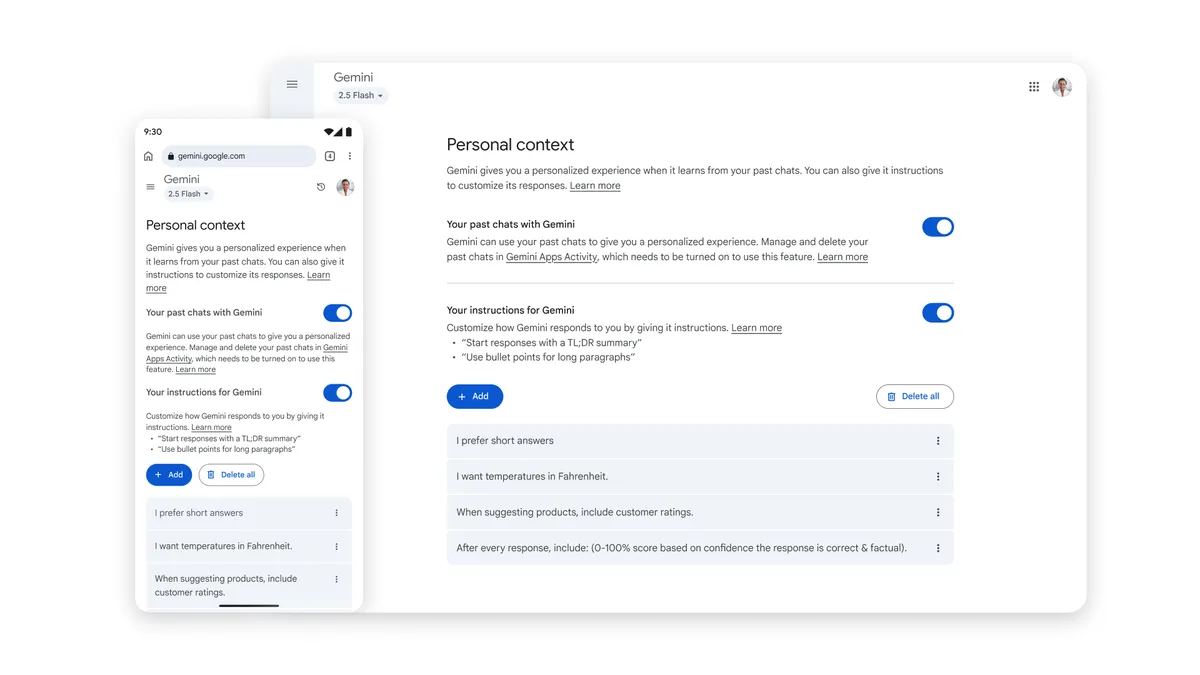
Gemini Personal Context settings (source image)
Gemini's use of past chats for personalization depends on the relevant Personal Intelligence / Memory settings being available and enabled. Source: Google.
So if Gemini forgets what you told it, the problem may not be the model at all.
The feature may be off, unavailable on the account, or unsupported in the mode you are currently using.
Claude
Claude now supports persistent memory across normal Chat and cloud Cowork, with memory controls exposed by Topic.
Source: Anthropic — Claude's Memory Works Everywhere

Claude now shares remembered context across Chat and cloud Cowork, subject to memory settings and product behavior. Source: Anthropic.
If persistent memory is not enabled or relevant to the product surface you are using, Claude may still behave more like a fresh conversation.
Reason 3: you used a Temporary or Incognito chat
Sometimes the AI forgot because you explicitly used the mode designed to forget.
Human beings do enjoy pressing privacy buttons and then becoming offended when privacy occurs.
ChatGPT Temporary Chat
OpenAI's Temporary Chat behavior has become more nuanced in 2026.
Temporary chats start non-personalized by default.
A non-personalized Temporary Chat:
- does not use normal memory for personalization,
- does not create new memories,
- and does not appear in normal history unless you save it.
ChatGPT can also offer a personalized Temporary Chat in supported experiences.
A personalized Temporary Chat can use existing memories and custom instructions, but it still does not create or update new memories while it remains temporary.
Source: OpenAI Help — Temporary Chat FAQ
This can create a confusing situation.
You may have a very personal Temporary Chat because existing memory was available.
Then you share something new and important.
Later, ChatGPT does not remember the new information.
That is expected if the conversation remained temporary.
Gemini Temporary Chat
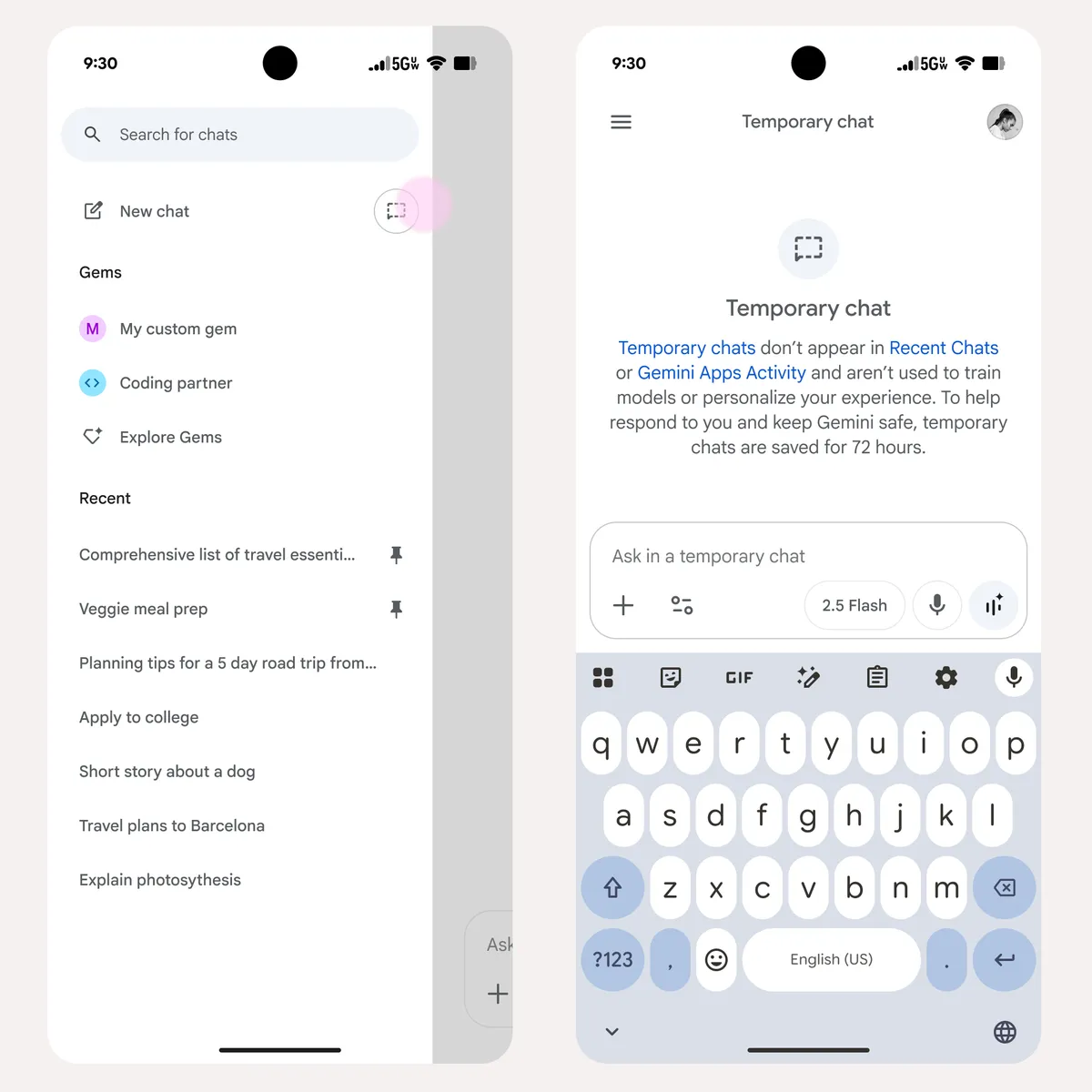
Google says Gemini Temporary Chats:
- do not appear in recent chats or normal Gemini Apps Activity,
- do not personalize future chats,
- and are not used like normal saved conversation history.
Source: Google — Temporary Chats and Personalization
Gemini Temporary Chat (source image)
Gemini Temporary Chat is deliberately separated from normal personalization and future memory. Source: Google.
Claude Incognito Chat
Claude also provides incognito-style conversations designed not to contribute to persistent memory or normal past-chat retrieval.
If you deliberately use a non-persistent mode, the correct behavior is forgetting.
That is not a bug.
It is the privacy feature doing its job.
Reason 4: the AI intentionally decided the information was not worth remembering
This is one of the more interesting reasons.
A good AI should not save everything you say forever.
Imagine if every message became permanent memory:
“I am buying milk tonight.”
“I watched a bad movie.”
“I think I want pizza.”
“Maybe I should learn guitar.”
“Actually, never mind.”
Six years later, your personal AI would be carrying around the informational equivalent of a junk drawer.
Useful memory requires selection.
Pi explains this distinction very clearly
Pi's current memory documentation says it focuses on information that is likely to remain true for a while.
Examples include:
- job or field of study,
- communication preferences,
- goals,
- routines,
- hobbies,
- important personal context.
Pi explicitly says it may skip things that are:
- temporary,
- one-off,
- or unlikely to help future conversations.
Source: Pi Help Center — Pi's Memory

Pi intentionally prioritizes durable context rather than treating every temporary statement as permanent memory. Source: Pi.
That means:
“I am going to the store tonight.”
may be deliberately forgotten.
But:
“I am vegetarian.”
is far more likely to remain useful.
ChatGPT works similarly at a broader scale
OpenAI says its newer memory system automatically tracks context it determines to be important rather than forcing every detail into a permanent saved-memory list.
Source: OpenAI — Better Memory for ChatGPT
This is healthier than infinite retention.
But it creates an obvious failure mode:
you and the AI may disagree about what was important.
You may mention something once that matters enormously to you.
The system may interpret it as temporary context.
Later, it appears to have forgotten.
Reason 5: the memory exists, but retrieval failed
This is the most important technical explanation.
Suppose an AI remembers 500 useful facts and summaries about you.
You ask:
“Should I book the trip?”
Which memories should appear?
Potentially:
- where the trip is,
- budget,
- schedule,
- travel preferences,
- who you are traveling with,
- previous discussion about the trip.
Not relevant:
- your preferred coding language,
- the name of your dentist,
- your abandoned 2024 running goal,
- an old restaurant preference.
The system has to choose.
This is retrieval.
The memory can exist perfectly and still fail to appear in the current response.
Stored information is not automatically active information
This is why users sometimes experience something strange:
“Yesterday the AI remembered this perfectly. Today it doesn't.”
The underlying information may still exist.
But the current question may not have triggered the same retrieval path.
Different wording can produce different retrieval results.
For example:
Weak retrieval cue:
“What do you think?”
Better retrieval cue:
“Use what we discussed last week about whether I should move to Singapore.”
The second prompt gives the retrieval system much more to work with.
ChatGPT now surfaces Memory Sources
OpenAI added Memory Sources across consumer plans in 2026.
These can show some of the context that helped personalize an answer, including:
- saved memories,
- past chats,
- custom instructions,
- and, on supported plans and configurations, files or connected Gmail context.
Source: ChatGPT Release Notes — May 5, 2026

Memory Sources can help users see which past context actually contributed to the current ChatGPT response. Source: OpenAI.
If the answer ignored something important, this can help distinguish:
“ChatGPT forgot the memory.”
from:
“The memory exists, but it was not considered relevant here.”
Those are different failures.
Reason 6: your question is too vague for the AI to know which old context matters
Humans are very good at ambiguous references with people who know us.
We say:
“It happened again.”
A close friend knows what “it” is.
An AI has to infer from:
- current text,
- retrieved past context,
- timing,
- topic similarity,
- and available memory.
If several possible situations match, the system may fail to retrieve the right one.
Consider the difference:
Vague
“What did I decide?”
Better
“What did I decide about whether to keep working on the app or look for a job?”
The second prompt provides semantic anchors.
More specific does not mean writing a giant prompt
You do not need to restate the whole story.
Just provide one or two retrieval clues.
For example:
“Use the conversation where we discussed the launch delay.”
“I mean the person I was talking about last week.”
“This is about the job offer I mentioned before.”
“Search our previous chats about the Android release.”
That may be enough to pull the right context forward.
Reason 7: newer information replaced or weakened the old memory
Sometimes forgetting is actually updating.
Suppose you said:
“I want to move to London.”
Then two months later:
“I do not think I want to move anymore.”
A good AI should not continue confidently telling you:
“Since your goal is moving to London…”
The older context should become historical.
Modern memory systems increasingly attempt to handle this.
ChatGPT explicitly focuses on memory freshness
OpenAI's June 2026 memory architecture was designed to reduce:
- stale memory,
- contradictory memories,
- and context that remains incorrectly current over long time periods.
Source: OpenAI — Dreaming: Better Memory for ChatGPT

Stale or missing context can make a personalized system behave as though an old situation is still current. Source: OpenAI.

Time-aware context allows later answers to reflect what is currently true instead of merely preserving old facts. Source: OpenAI.
Claude lets you edit memory directly
Claude's newer memory system makes this behavior unusually visible.
Memory appears as individual Topics.
You can open a Topic and correct or delete it.

Claude exposes remembered information as individual Topics, which makes stale context easier to inspect. Source: Anthropic.

Users can edit or delete Claude memory Topics when an old fact is no longer current. Source: Anthropic.
So when the AI “forgets” an old goal, ask:
Is this actually forgetting, or did newer context supersede it?
That distinction matters.
Reason 8: the product separates contexts on purpose
Not every part of your life should leak into every conversation.
If you use AI for:
- personal reflection,
- work,
- university,
- client projects,
- creative writing,
- and roleplay,
a single giant global memory could become a disaster.
Imagine your AI importing a joke from a fictional story into an investor memo because technically it “remembered” you.
Context separation is useful.
Claude Projects
Claude can maintain project-specific context and memory spaces.
That means information in one project may not behave exactly like global context elsewhere.
This reduces context pollution.
It also means users can sometimes interpret deliberate separation as forgetting.
Work and personal accounts
You may also have:
- a personal account,
- a company workspace,
- a school account,
- or different login identities.
Those systems may have separate data and memory policies.
What your personal AI knows is not automatically what your enterprise workspace knows.
That is usually desirable.
Gemini account restrictions
Google explicitly says past-chat Memory is not available on work, school, or supervised accounts.
Source: Gemini Help — Memory of Past Chats
So if Gemini remembers you on one personal account and seems forgetful in another context, account boundaries may be the explanation.
Reason 9: the feature is not available in the mode you are using
This is one of the least satisfying reasons because the UI can make one product feel like one continuous assistant even when the underlying capabilities differ by surface.
Gemini
Google currently says memory of past chats is not available everywhere.
Its help documentation lists supported surfaces and notes that the feature is not available in certain experiences such as:
- Gems,
- or Gemini Live for direct memory behavior.
A text chat can still reference a previous Gemini Live conversation when asked.
Source: Gemini Help — Memory of Past Chats
So:
“Gemini remembered this in text but forgot in another mode.”
may be product design, not randomness.
ChatGPT
Memory behavior can vary by:
- account,
- plan,
- personalization settings,
- Temporary Chat status,
- supported connected sources,
- and rollout state.
OpenAI has repeatedly expanded memory in phases across plans and regions.
Claude
Claude memory, explicit past-chat search, and project behavior can also differ by plan or feature.
If continuity matters to you, do not rely only on the marketing sentence:
“Now with memory.”
Check:
- your plan,
- your account type,
- your current mode,
- and the actual settings.
Software products have apparently discovered that a feature can both “exist” and “not be available to you” at the same time. Very efficient.
Reason 10: the AI is designed to remember useful context, not every exact sentence
This is the most important expectation reset.
A personal AI is not necessarily trying to become a perfect courtroom transcript of your life.
Its memory may preserve:
“The user is building an Android app and targeting a September launch.”
rather than the exact 2,800-word conversation where you described every bug.
That is usually the right design.
When you need the exact old conversation, you want retrieval, not summarized memory.
ChatGPT past-chat retrieval
OpenAI improved past-chat detail retrieval in January 2026.
With the relevant chat-history features enabled on supported plans, ChatGPT can more reliably find specific details from previous chats when asked and surface the old chat as a source.
Source: ChatGPT Release Notes
Claude past-chat search
Claude allows supported paid users to ask naturally for past discussions.
Examples:
“What did we discuss about this?”
“Find the conversation where we compared those options.”
Claude can retrieve the old context and cite the original chat.
Source: Claude Help — Chat Search and Memory
This distinction gives you a simple rule:
Need the idea? Use memory.
Need the exact discussion? Retrieve the old chat.
Why AI can remember one day and forget the next
This feels especially strange.
You mention something.
The AI recalls it perfectly later.
Then another day it fails.
Several mechanisms can explain this without assuming the memory disappeared.
Different wording triggered different retrieval
Query A:
“What should I do before launch?”
Query B:
“What should I focus on this month?”
The same launch context may be obviously relevant to the first query and less obvious to the second.
More recent context competed with the old memory
The system may prioritize newer information.
The product updated its synthesized memory
Modern systems increasingly consolidate or rewrite their memory state.
You changed mode or conversation type
Normal chat vs Temporary Chat.
Text vs another product surface.
Global chat vs project.
The system simply made a retrieval error
AI retrieval is probabilistic.
It can fail.
That does not require a sophisticated philosophical explanation.
Sometimes the machine missed the document.
Why AI sometimes remembers things you wish it would forget
The reverse problem is equally common.
You delete a chat.
Then the AI still remembers the information.
This can happen because the chat and the memory are stored separately.
ChatGPT
OpenAI says saved memories may be stored separately from chat history.
Deleting a conversation does not necessarily remove a saved memory that was derived from it.
To fully remove context, you may need to:
- delete the memory,
- and delete the original chat where the information appeared.
Source: OpenAI Memory FAQ
Gemini
Google says deleting a past chat may have a short delay before the deleted information stops affecting personalization.
If information also exists in a connected Google app, deleting the chat alone may not remove the source.
Google explains that users may need to:
- delete relevant chats,
- and disconnect or change the connected source.
Source: Gemini Help — Memory of Past Chats
Replika
Replika separates visible chat history from memory too.
Its help documentation says visible chat history is limited to roughly four months, while learned memories and diary entries can persist independently.
Source: Replika — Is the Chat History Infinite?
This is why memory controls can feel unintuitive.
Deleting the evidence is not always the same as deleting the derived knowledge.
How ChatGPT memory can fail
ChatGPT is currently one of the strongest general-purpose systems for cross-conversation personalization.
It can still forget.
Common reasons include:
- memory disabled,
- insufficient history,
- Temporary Chat,
- the information never becoming important memory,
- retrieval not finding the relevant chat,
- newer context replacing the old version,
- using an account or workspace with different settings,
- or expecting exact transcript recall from synthesized memory.
Check the Memory Summary
ChatGPT's Memory Summary can help determine whether the system currently carries the context you expected it to remember. Source: OpenAI.
If the expected information is missing, you can:
- tell ChatGPT to remember or update it,
- refresh the memory summary,
- or restate the context in a durable way.
If the memory is present but not being used, ask:
“Use the relevant context from my memory and previous chats before answering.”
This turns the problem into explicit retrieval.
How Claude memory can fail
Claude is unusually transparent because remembered context appears as Topics.
This makes debugging easier.
If Claude forgets something:
- Open Memory settings.
- Check whether the Topic exists.
- Check whether the information is correct.
- Update it if necessary.
- If the exact old conversation matters, use chat search.
Claude's topic-based interface makes it easier to distinguish “not remembered” from “remembered incorrectly.” Source: Anthropic.
Claude also intentionally excludes some sensitive topics from memory by default.
So the AI may repeatedly need context in categories where automatic memory is deliberately conservative.
That is a privacy decision, not necessarily a technical limitation.
How Gemini memory can fail
Gemini has one of the more conditional memory setups.
If it seems forgetful, check:
- Is Memory on?
- Is Keep Activity on?
- Are you using a personal Google Account?
- Are you 18+?
- Is the feature available in your country and current product surface?
- Are you using a mode that supports it?
- Was the old chat deleted?
- Was the relevant information in a connected app rather than the chat itself?
Google says you can ask:
“Did you use any info from past chats?”
This is a useful diagnostic prompt.
Source: Gemini Help — Memory of Past Chats
Connected data can create a second source of truth
Gemini's broader Personal Intelligence may use connected Google apps.
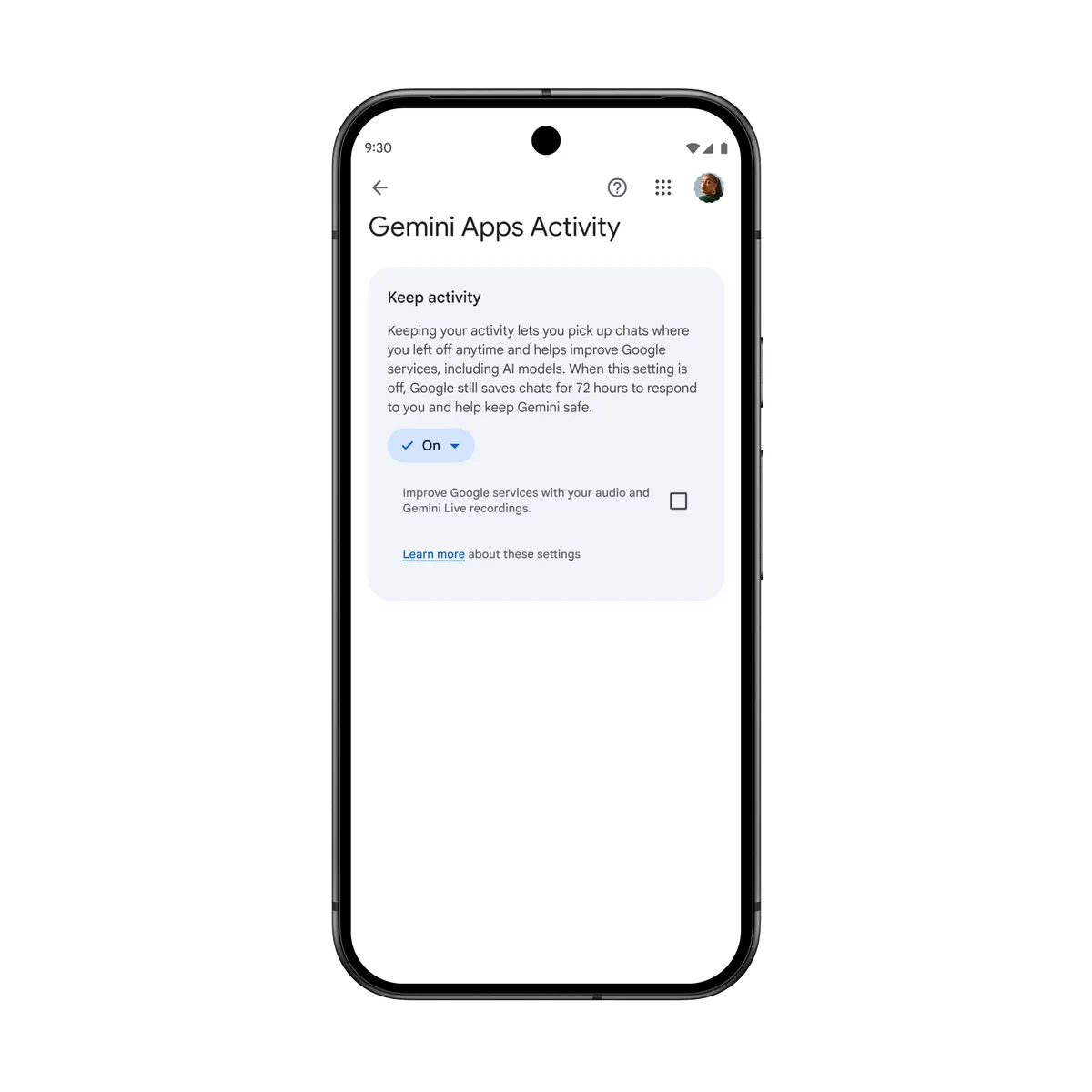
Gemini Personal Intelligence controls (source image)
Gemini personalization can involve activity and connected sources beyond ordinary chat history. Source: Google.
This can make “forgetting” more complicated.
Maybe the past chat disappeared.
But the information still exists in Gmail.
Or Photos.
Or another connected source.
A broader context system has more ways to remember.
It also has more places to debug.
How Pi memory can fail
Pi offers one of the clearest explanations of selective memory.
Pi remembers across chats, but its help documentation says it prioritizes context that is likely to remain true.
That means some temporary details are deliberately ignored.
Source: Pi's Memory
If something matters and Pi keeps missing it, you can explicitly say:
“Remember that…”
Pi's help center notes you may sometimes need to repeat the request to make a detail stick reliably.
You can also manage memories directly in settings.

Pi is built around conversational continuity, but it still selectively retains information rather than preserving every interaction as durable memory. Source: Pi.
This is a useful model for understanding AI memory generally:
Forgetting can be a filtering decision, not merely a failure.
How Replika memory can fail
Replika's memory is layered.
Its help center says some memories are visible in the Memory tab, while deeper personalization is derived from patterns across conversations.
Source: Replika — How Memory Works

Replika combines explicit saved memories with broader personalization derived from the relationship history. Source: Replika.
This creates two kinds of failure:
- a specific fact is not present in explicit memory,
- or the broader learned behavior does not retrieve the detail correctly.
Replika's documentation also says users can ask:
“Facts about me”
to surface something the AI remembers from previous conversations.
Source: Replika — Commands

Replika's companion model builds continuity from repeated interaction, but exact recall and visible chat history remain separate concepts. Source: Replika.
The hidden problem: AI memory has to forget
Perfect memory sounds ideal.
It is not.
Imagine an AI that permanently remembers:
- every temporary mood,
- every half-formed idea,
- every discarded goal,
- every joke,
- every hypothetical,
- every person you briefly mentioned,
- every preference that changed,
- every incorrect statement you later corrected.
The system would become less personal over time.
Not more.
Good memory needs forgetting, updating, compression, and relevance filtering.
The difficult question is:
What should be forgotten?
Users and algorithms will not always agree.
That disagreement is one reason memory still feels unreliable.
A useful mental model: AI memory is not a diary, it is a working model
A diary tries to preserve what happened.
AI memory tries to preserve what may help future responses.
Those goals overlap.
They are not identical.
Consider this conversation:
“I am furious with my job today. I want to quit tomorrow.”
A diary should preserve that sentence exactly.
A personal context system should probably avoid immediately turning it into:
“Permanent goal: quit job.”
One emotional day should not overwrite months of context.
Likewise:
“Maybe I want to move to Japan.”
may be exploration.
Not a commitment.
A good context system has to distinguish:
- statement,
- preference,
- plan,
- possibility,
- decision,
- temporary mood,
- and durable fact.
This is why human-level memory feels effortless while machine memory becomes a small ontology project.
How to make an AI remember more reliably
You cannot eliminate every retrieval failure.
You can make important context much more likely to survive.
1. Be explicit when something should remain useful later
Say:
“This is important context for future conversations.”
or:
“Remember that my launch date moved to October.”
or:
“Please keep this as ongoing context until I tell you it changed.”
This removes ambiguity.
The AI no longer has to infer whether the detail is a temporary comment or durable information.
2. Store the durable version, not the entire story
Weak memory:
“Yesterday I had an argument with my cofounder at 3 PM after lunch because we were discussing the onboarding flow and then…”
Better durable context:
“My cofounder and I currently disagree about whether onboarding should optimize for speed or education. This is still unresolved.”
The second statement is more likely to remain useful.
This is the difference between event history and current state.
3. Tell the AI when information changes
Do not leave old context silently wrong.
Say:
“Update this: I am no longer planning to move.”
“The launch date changed from September to November.”
“That preference is outdated.”
“Forget the old version and use this going forward.”
Modern memory systems increasingly support conversational correction.
Use it.
4. Give retrieval clues when returning to an old topic
Instead of:
“What do you think now?”
say:
“Use our previous conversations about the Google Play launch before answering.”
You are helping the retrieval system identify the relevant context.
That is not repeating yourself.
It is pointing to the right drawer.
5. Ask whether the AI actually remembers it
Try:
“What do you currently remember about this project?”
or:
“What do you remember about my situation with X?”
or:
“Before answering, summarize the relevant context you are using.”
This gives you a chance to catch missing or stale information before it distorts the answer.
6. Use the product's explicit memory controls
ChatGPT
Check:
Settings → Personalization → Memory / Memory Summary
Use Memory Sources when available to inspect personalization.
Claude
Check:
Settings → Memory → Topics
Edit or delete stale entries directly.
Gemini
Check:
Settings → Personal Intelligence / Memory
Make sure Keep Activity is enabled if you want past-chat memory and your account is eligible.
Pi
Check:
Settings → Account → Manage Memories
Add or delete durable context explicitly.
The controls exist because conversational inference is imperfect.
Use them.
7. Use search when you need exact history
If you need:
“The exact thing I said last month”
do not rely on summarized memory.
Use:
- ChatGPT chat-history search,
- Claude past-chat search,
- Gemini previous-chat retrieval,
- or the app's history interface.
Memory is optimized for usefulness.
Search is optimized for recovery.
Different jobs.
8. Avoid Temporary or Incognito mode when the conversation should matter later
This sounds obvious.
It is still worth saying.
If you expect:
“I want the AI to remember this next month.”
do not have the conversation in a mode intentionally designed not to contribute normal persistent context.
If privacy matters more than continuity, Temporary Chat may be exactly right.
You just have to choose which behavior you want.
9. Keep important ongoing situations in a stable context space
If the app supports Projects, workspaces, or dedicated threads, use them for long-running topics.
Examples:
- startup launch,
- thesis,
- job search,
- relationship planning,
- trip,
- fitness goal,
- creative project.
This reduces the amount of retrieval work needed.
The system knows where the relevant context lives.
10. Do not test memory with trivia unless trivia is your real use case
People often test AI memory like this:
“Remember that my secret word is watermelon.”
Then they return weeks later and ask:
“What is my secret word?”
That tests whether the system retained one arbitrary token.
Fine.
It does not tell you whether the AI is good at remembering your life.
A better test is:
“I am deciding between staying in my job and taking six months off to build my product. My biggest constraint is financial runway.”
Later:
“I think I am leaning toward taking the risk.”
Can the AI understand the decision context?
That is much closer to what useful memory is actually for.
A 7-day memory test you can run on any AI
If you want to know whether an app truly remembers you, test it in normal use.
Day 1: give it an ongoing situation
Example:
“I am launching an Android app next month. The biggest remaining problem is onboarding.”
Do not use a meaningless secret phrase.
Day 2: tell it one stable preference
Example:
“When we discuss technical decisions, I prefer short explanations first and detail only if needed.”
Day 3: add one person
Example:
“Sam is the designer helping me with onboarding.”
Day 4: change something
Example:
“The launch moved back two weeks.”
Day 5: open a new conversation
Ask:
“What do you think I should prioritize before launch?”
See whether the system retrieves:
- Android app,
- onboarding,
- changed launch timing.
Day 6: use an ambiguous reference
Ask:
“I talked to Sam and we changed it.”
See whether the AI can infer what “it” likely means.
Do not judge too harshly here.
This is a difficult retrieval test.
Day 7: ask for the memory state
Ask:
“What do you currently remember about my launch?”
Then compare:
- accuracy,
- freshness,
- relevance,
- and editability.
That tells you far more than a secret-word test.
When forgetting is actually a good sign
There are cases where you want the AI to forget.
Temporary emotional states
“I hate everyone today.”
Probably not a durable user preference.
Hypotheticals
“Imagine I move to Tokyo.”
The AI should not immediately rewrite your home city.
Roleplay
A fictional relationship or character trait should not leak into real-life context.
Sensitive information
Some products deliberately avoid automatically storing certain categories.
Claude, for example, does not store several sensitive topics in memory by default unless the user enables additional controls.
One-time logistics
“My meeting is at 4 PM today.”
Useful now.
Probably irrelevant in six months.
Good forgetting is part of good personalization.
The real goal is not “never forget”
The phrase:
“AI that never forgets”
sounds powerful.
It is probably the wrong product goal.
A better goal is:
“AI that remembers what remains useful, updates what changed, forgets what no longer matters, and retrieves the right context when you need it.”
That is harder.
It is also much closer to what users actually want.
Memory vs context: why Gemora cares about the difference
Gemora is built around talking through everyday life.
That includes:
- relationships,
- work,
- goals,
- stress,
- decisions,
- travel,
- ordinary days,
- and the things you keep coming back to.
For that use case, remembering isolated facts is not enough.
Suppose you say:
“I finally did it.”
A database might know many things about you.
The useful question is:
Which past context makes this sentence meaningful?
Maybe you finally:
- quit the job,
- launched the app,
- called someone,
- booked the trip,
- submitted the application,
- or made the decision you had been postponing.
That is why the goal is continuity rather than perfect storage.

Gemora Recap is designed to make previous days and conversations easier to revisit as part of a continuing life context. Source: Gemora.
Old context should be easy to rediscover

Gemora Memories focuses on resurfacing meaningful context instead of forcing users to manually search every old chat. Source: Gemora.
The question is not:
“Did the system store 8,000 facts?”
It is:
“Can the right old context return when today's conversation needs it?”
The system also needs to understand change

Longitudinal context becomes more useful when the AI can notice what changes instead of preserving an old version of the user forever. Source: Gemora.
Maybe three months ago you wanted one thing.
Now you want another.
Both conversations matter.
The current answer should understand the difference.
That is the larger problem behind AI forgetting:
memory is not simply persistence.
It is persistence + time + relevance + retrieval.
Your life does not restart when you open a new chat. Gemora is built around keeping useful context connected so later conversations can begin with more understanding. Start talking with Gemora.
A practical troubleshooting checklist
If your AI keeps forgetting something important, go through this list.
Step 1: Is memory enabled?
Check the app's personalization or memory settings.
Step 2: Was the original conversation temporary?
If yes, it may have been intentionally excluded from persistent memory.
Step 3: Is the information actually durable?
A one-time event may not have been selected for long-term retention.
Step 4: Ask what the AI remembers
Do not guess.
Ask directly.
Step 5: Check the memory interface
If available, inspect:
- ChatGPT Memory Summary,
- Claude Topics,
- Gemini Personal Intelligence settings,
- Pi Manage Memories,
- Replika Memory.
Step 6: Correct stale information
Update old facts explicitly.
Step 7: Give a retrieval cue
Say:
“Use our previous conversations about X.”
Step 8: Search the exact old chat if needed
Do not rely on summarized memory for verbatim recovery.
Step 9: Check account and plan boundaries
Make sure you are not using:
- a different account,
- a work workspace,
- a school profile,
- a different project,
- or a feature surface without memory.
Step 10: accept occasional retrieval failure
No current consumer AI has perfect human-like recall.
If the information is critical, store it explicitly and verify it.
Final answer
Your AI keeps forgetting what you told it because AI memory is not one continuous human-like memory system.
It is a stack of mechanisms.
Your information may exist in:
- the current chat,
- saved history,
- long-term memory,
- a project,
- a connected app,
- or an old conversation waiting to be retrieved.
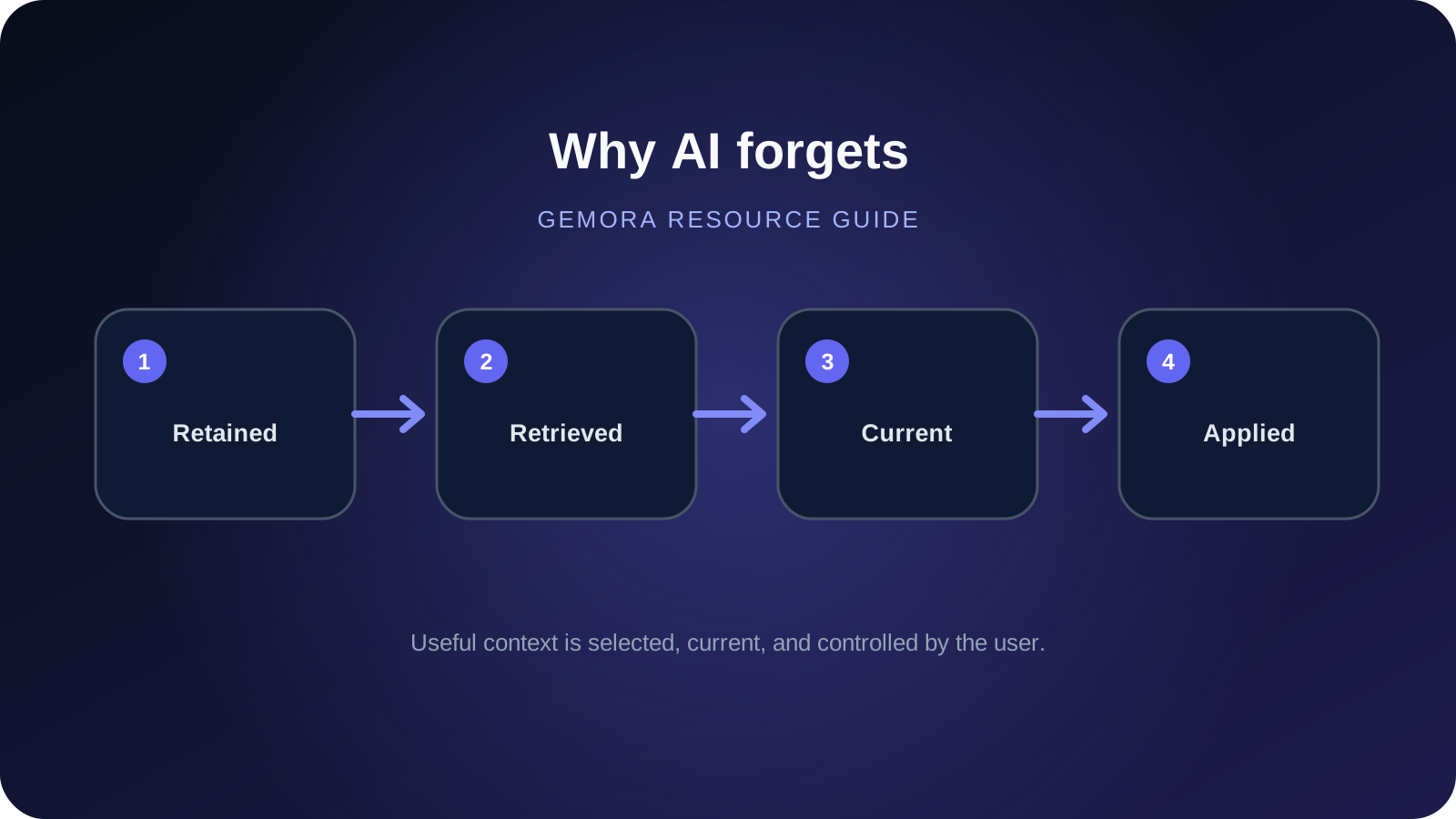
For the AI to “remember” at the right moment, several things have to go right:
- the information has to be retained,
- it has to remain current,
- the current conversation has to make it relevant,
- the retrieval system has to find it,
- the product has to allow that context in the current mode,
- and the model has to use it correctly.
If one step fails, the experience feels like forgetting.
That is why the future of personal AI is not simply:
more memory.
It is:
better selection, better retrieval, better updating, clearer controls, and continuity across time.
You probably do not want an AI that remembers every sentence forever.
You want one that knows:
what still matters, what changed, and what part of the past matters now.
That is a much harder problem.
It is also the one that actually makes AI feel personal.
You already explained the story once. Gemora is built around conversations about your life staying connected so you can keep going instead of rebuilding the context every time. Start talking with Gemora.
مواصلة الموضوع
Keep the useful thread without saving everything
قم بتوصيل المحادثات والسياق المفيد والتأملات والمشاريع والمهام في مساحة عمل شخصية واحدة.
ابدأ مجانًاالأسئلة المتداولة
Why does AI forget previous conversations?
A chat can remain in history without becoming reusable memory, or the relevant memory may not be retrieved into the current conversation.
Is AI memory the same as chat history?
No. Chat history is an archive; memory is selected or synthesized context that may influence a later answer.
How can I make AI remember more reliably?
State durable context explicitly, verify memory controls, give retrieval cues, update stale facts, and keep exact records in a stable project or note.
المصادر ومزيد من القراءة
Written by Khai Tran and reviewed under the Gemora Editorial Policy.